

ADVERTISEMENT

AI Assistant
Notifications
Clear all

Best Method to Convert the 3D Model to STL

6 Posts
6 Users
0 Reactions
4,385 Views
Active Member
Joined: 5 years ago
Posts: 5
Topic starter
Translate
English
Spanish
French
German
Italian
Portuguese
Russian
Chinese
Japanese
Korean
Arabic
Hindi
Dutch
Polish
Turkish
Vietnamese
Thai
Swedish
Danish
Finnish
Norwegian
Czech
Hungarian
Romanian
Greek
Hebrew
Indonesian
Malay
Ukrainian
Bulgarian
Croatian
Slovak
Slovenian
Serbian
Lithuanian
Latvian
Estonian
  [#223]

What would be the best method to convert the 3D model into STL?

I know currently each CAD/3Dmodeling software provide export/import option to convert to STL. However I found some of converted stl are not up to the high quality. That require for 3D printing.


ReplyQuote
Great Ruler Moderator
Joined: 5 years ago
Posts: 60
Translate
English
Spanish
French
German
Italian
Portuguese
Russian
Chinese
Japanese
Korean
Arabic
Hindi
Dutch
Polish
Turkish
Vietnamese
Thai
Swedish
Danish
Finnish
Norwegian
Czech
Hungarian
Romanian
Greek
Hebrew
Indonesian
Malay
Ukrainian
Bulgarian
Croatian
Slovak
Slovenian
Serbian
Lithuanian
Latvian
Estonian
 

I always use Geomagic Design X if you have the solid CAD model and can convert into Parasolid, STEP, IGES..

Step 01 - Import the CAD Solid model into Geomagic Design X

Step 02 - Go to "POLYGON" tool bar and then select "Convert To Mesh"
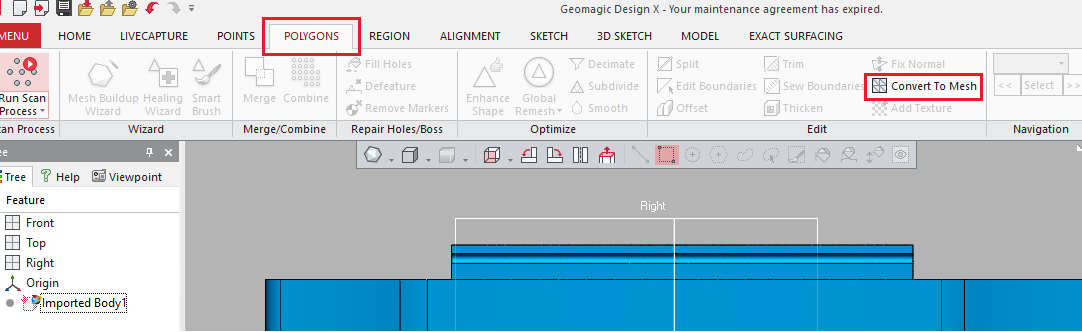
Polygon Tool Bar

Step 03 - Control the quality you want for conversion of the MESH
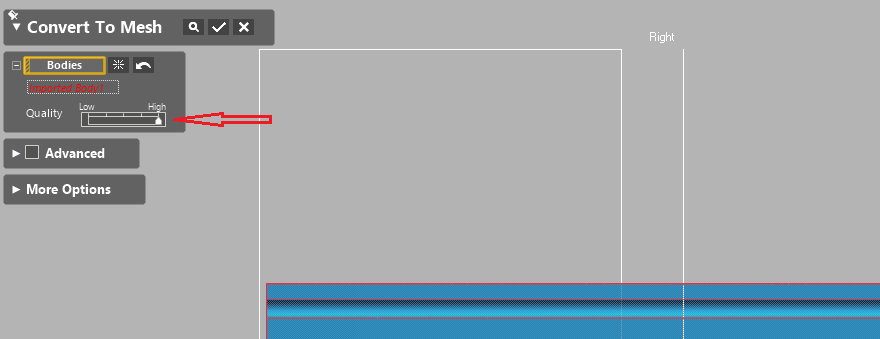
Convert To Mesh

Step 04 - Finally you can export converted mesh to STL/OBJ,.
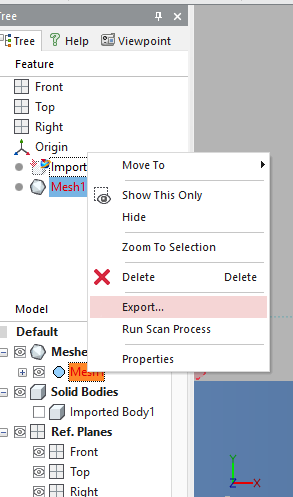
Export to STL


ReplyQuote
Eminent Member
Joined: 5 years ago
Posts: 20
Translate
English
Spanish
French
German
Italian
Portuguese
Russian
Chinese
Japanese
Korean
Arabic
Hindi
Dutch
Polish
Turkish
Vietnamese
Thai
Swedish
Danish
Finnish
Norwegian
Czech
Hungarian
Romanian
Greek
Hebrew
Indonesian
Malay
Ukrainian
Bulgarian
Croatian
Slovak
Slovenian
Serbian
Lithuanian
Latvian
Estonian
 

In Fusion 360, right click on the body or component you want to export in the feature tree on right and select export to stl, then select a save location.


ReplyQuote
Active Member
Joined: 5 years ago
Posts: 18
Translate
English
Spanish
French
German
Italian
Portuguese
Russian
Chinese
Japanese
Korean
Arabic
Hindi
Dutch
Polish
Turkish
Vietnamese
Thai
Swedish
Danish
Finnish
Norwegian
Czech
Hungarian
Romanian
Greek
Hebrew
Indonesian
Malay
Ukrainian
Bulgarian
Croatian
Slovak
Slovenian
Serbian
Lithuanian
Latvian
Estonian
 

Open the rar archive file in something like blender or tinkercad.

Export as stl.

Open stl in your slicer.


ReplyQuote
Eminent Member
Joined: 5 years ago
Posts: 22
Translate
English
Spanish
French
German
Italian
Portuguese
Russian
Chinese
Japanese
Korean
Arabic
Hindi
Dutch
Polish
Turkish
Vietnamese
Thai
Swedish
Danish
Finnish
Norwegian
Czech
Hungarian
Romanian
Greek
Hebrew
Indonesian
Malay
Ukrainian
Bulgarian
Croatian
Slovak
Slovenian
Serbian
Lithuanian
Latvian
Estonian
 

Import the .stp (STEP) file into a CAD package such as Fusion 360, and then export the model as an STL file.


ReplyQuote
Eminent Member
Joined: 5 years ago
Posts: 25
Translate
English
Spanish
French
German
Italian
Portuguese
Russian
Chinese
Japanese
Korean
Arabic
Hindi
Dutch
Polish
Turkish
Vietnamese
Thai
Swedish
Danish
Finnish
Norwegian
Czech
Hungarian
Romanian
Greek
Hebrew
Indonesian
Malay
Ukrainian
Bulgarian
Croatian
Slovak
Slovenian
Serbian
Lithuanian
Latvian
Estonian
 

https://www.youtube.com/watch?v=1z8OxO5FOso


ReplyQuote

Welcome to WiYa3D...!

Login to your account below

Create New Account!

Fill the forms bellow to register

*By registering into our website, you agree to the Terms & Conditions and Privacy Policy.

Retrieve your password

Please enter your username or email address to reset your password.