
What would be the best method to convert the 3D model into STL?
I know currently each CAD/3Dmodeling software provide export/import option to convert to STL. However I found some of converted stl are not up to the high quality. That require for 3D printing.
I always use Geomagic Design X if you have the solid CAD model and can convert into Parasolid, STEP, IGES..
Step 01 - Import the CAD Solid model into Geomagic Design X
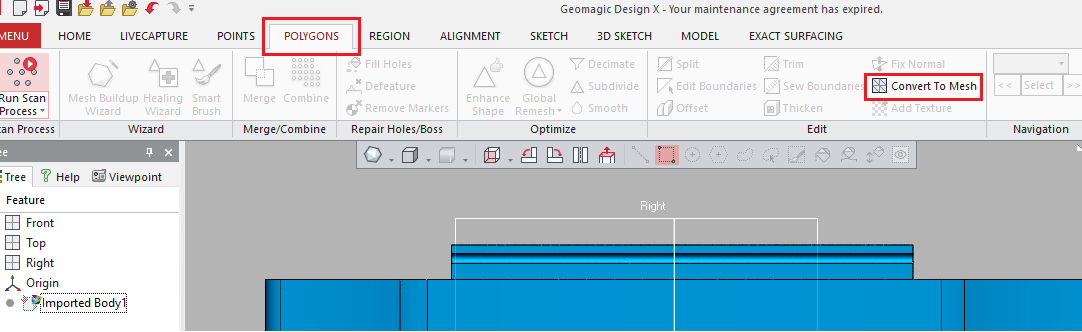
Step 02 - Go to "POLYGON" tool bar and then select "Convert To Mesh"
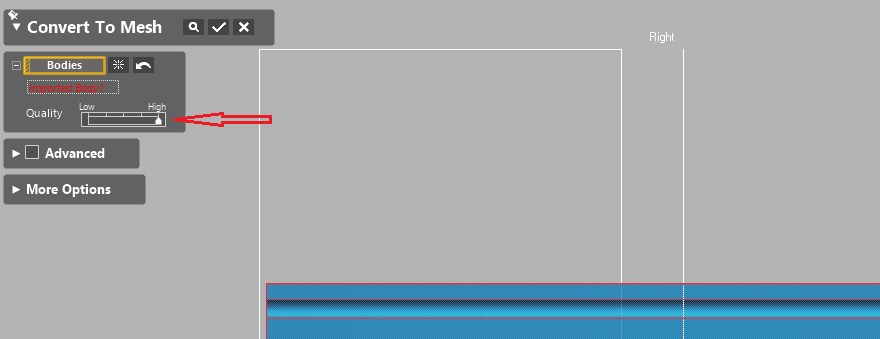
Step 03 - Control the quality you want for conversion of the MESH
Step 04 - Finally you can export converted mesh to STL/OBJ,.
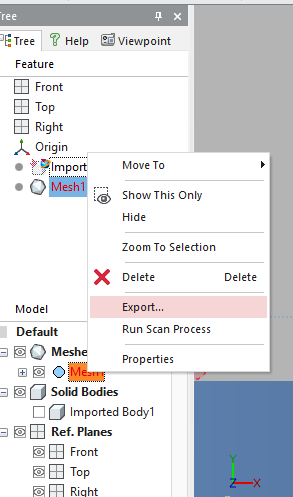
In Fusion 360, right click on the body or component you want to export in the feature tree on right and select export to stl, then select a save location.
Open the rar archive file in something like blender or tinkercad.
Export as stl.
Open stl in your slicer.
Import the .stp (STEP) file into a CAD package such as Fusion 360, and then export the model as an STL file.