

ADVERTISEMENT

AI Assistant
Notifications
Clear all

"There is no support generation method selected" error massage arise when try to generate support

3 Posts
2 Users
1 Reactions
2,910 Views
New Member
Joined: 4 years ago
Posts: 2
Topic starter
Translate
English
Spanish
French
German
Italian
Portuguese
Russian
Chinese
Japanese
Korean
Arabic
Hindi
Dutch
Polish
Turkish
Vietnamese
Thai
Swedish
Danish
Finnish
Norwegian
Czech
Hungarian
Romanian
Greek
Hebrew
Indonesian
Malay
Ukrainian
Bulgarian
Croatian
Slovak
Slovenian
Serbian
Lithuanian
Latvian
Estonian
  [#293]

Hi everyone,

I'm bit new to Materialize Magics software that we use for our new SLS machine. When I try to generate the support after importing he stl model to platform tha following error massage arise. 

"There is no support generation method selected. See machine setup"

No support generation method

where do I setup these setting?


ReplyQuote
Active Member
Joined: 4 years ago
Posts: 5
Translate
English
Spanish
French
German
Italian
Portuguese
Russian
Chinese
Japanese
Korean
Arabic
Hindi
Dutch
Polish
Turkish
Vietnamese
Thai
Swedish
Danish
Finnish
Norwegian
Czech
Hungarian
Romanian
Greek
Hebrew
Indonesian
Malay
Ukrainian
Bulgarian
Croatian
Slovak
Slovenian
Serbian
Lithuanian
Latvian
Estonian
 

It's seems still you haven't fully define the machine, platform setting.

Anyhow go to Build Preparation and click Machine Properties in pop up window go to support generation parameters. There you have the option support type selection to select support types
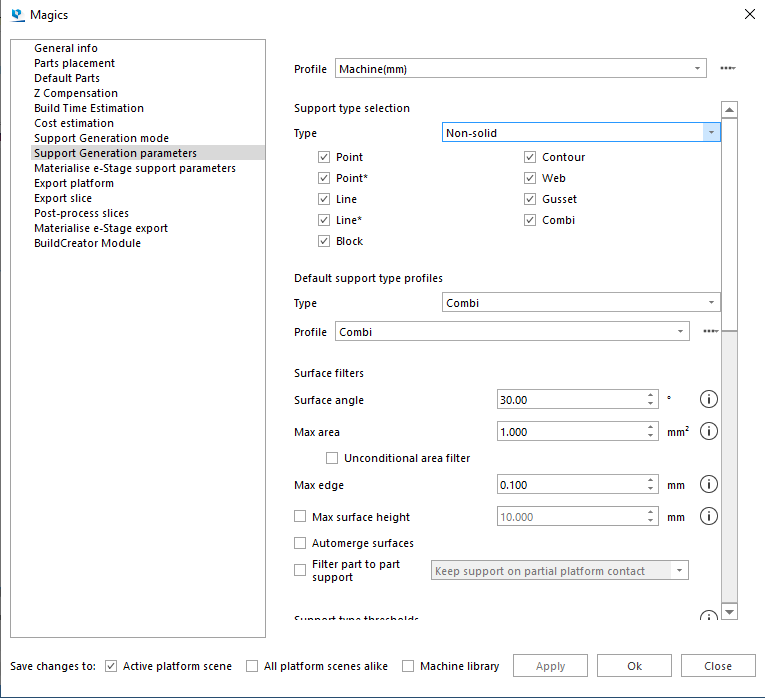
Support Type Selection


Diana Morkos reacted
ReplyQuote
New Member
Joined: 4 years ago
Posts: 2
Topic starter
Translate
English
Spanish
French
German
Italian
Portuguese
Russian
Chinese
Japanese
Korean
Arabic
Hindi
Dutch
Polish
Turkish
Vietnamese
Thai
Swedish
Danish
Finnish
Norwegian
Czech
Hungarian
Romanian
Greek
Hebrew
Indonesian
Malay
Ukrainian
Bulgarian
Croatian
Slovak
Slovenian
Serbian
Lithuanian
Latvian
Estonian
 
Posted by: @jacky

It's seems still you haven't fully define the machine, platform setting.

Anyhow go to Build Preparation and click Machine Properties in pop up window go to support generation parameters. There you have the option support type selection to select support types

I have changed & now supports are generating. 
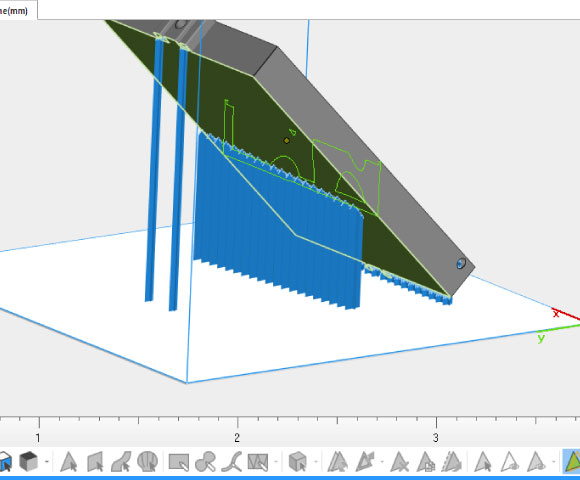
Support Generated Part


ReplyQuote

Welcome to WiYa3D...!

Login to your account below

Create New Account!

Fill the forms bellow to register

*By registering into our website, you agree to the Terms & Conditions and Privacy Policy.

Retrieve your password

Please enter your username or email address to reset your password.