
ADVERTISEMENT

AI Assistant
Notifications
Clear all

How to Add Display/Text Note to Model Component in NX

3 Posts
2 Users
2 Reactions
5,065 Views
Active Member
Joined: 4 years ago
Posts: 6
Topic starter
Translate
English
Spanish
French
German
Italian
Portuguese
Russian
Chinese
Japanese
Korean
Arabic
Hindi
Dutch
Polish
Turkish
Vietnamese
Thai
Swedish
Danish
Finnish
Norwegian
Czech
Hungarian
Romanian
Greek
Hebrew
Indonesian
Malay
Ukrainian
Bulgarian
Croatian
Slovak
Slovenian
Serbian
Lithuanian
Latvian
Estonian
  [#281]

Hi guys,

I wanted to add some display note or label text to my part components I'm designing. I know it can add some Balloon or notes in drafting. but I wanted to add these text notes in modeling environment of the NX.

Can you help me how do I find option to add component label note in NX?


ReplyQuote
Yoda
 Yoda
Jedi Master Moderator Registered
Joined: 5 years ago
Posts: 31
Translate
English
Spanish
French
German
Italian
Portuguese
Russian
Chinese
Japanese
Korean
Arabic
Hindi
Dutch
Polish
Turkish
Vietnamese
Thai
Swedish
Danish
Finnish
Norwegian
Czech
Hungarian
Romanian
Greek
Hebrew
Indonesian
Malay
Ukrainian
Bulgarian
Croatian
Slovak
Slovenian
Serbian
Lithuanian
Latvian
Estonian
 

Based on your requirement, we only know there is one possible solution by turn ON the PMI ( Product and Manufacturing Information).

File -> Turn ON the PMI then PMI tool bar will appear, in PMI tool bar you can find "Note", which can be used to add notes with arrow for components in modeling environment
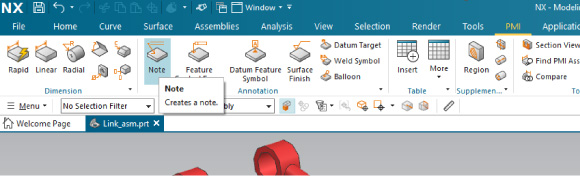
Siemens NX PMI

Pop up Note window, you have the option to,

Under Text Input - Desired Text Name/Label

Under Orientation - Desired Label Orientation by Selecting Plane or Developing WCS

Under Setting Area - Select the Text Font & Arrow Size

Under Leader - Will Provide the Arrow Leads Selection on Components
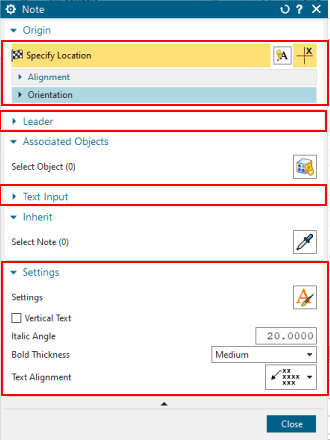
Siemens NX Note Window

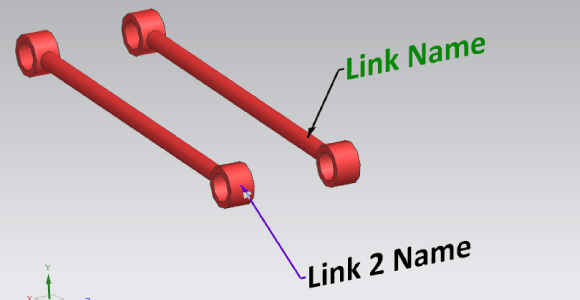
Siemens NX Component Label


Grand Master Yoda


Broad and Dhaval reacted
ReplyQuote
Active Member
Joined: 4 years ago
Posts: 6
Topic starter
Translate
English
Spanish
French
German
Italian
Portuguese
Russian
Chinese
Japanese
Korean
Arabic
Hindi
Dutch
Polish
Turkish
Vietnamese
Thai
Swedish
Danish
Finnish
Norwegian
Czech
Hungarian
Romanian
Greek
Hebrew
Indonesian
Malay
Ukrainian
Bulgarian
Croatian
Slovak
Slovenian
Serbian
Lithuanian
Latvian
Estonian
 
Posted by: @yoda

Based on your requirement, we only know there is one possible solution by turn ON the PMI ( Product and Manufacturing Information).

File -> Turn ON the PMI then PMI tool bar will appear, in PMI tool bar you can find "Note", which can be used to add notes with arrow for components in modeling environment

Siemens NX PMI

Yes, this is, what I look for. 

Thank you


ReplyQuote

Welcome to WiYa3D...!

Login to your account below

Create New Account!

Fill the forms bellow to register

*By registering into our website, you agree to the Terms & Conditions and Privacy Policy.

Retrieve your password

Please enter your username or email address to reset your password.