
ADVERTISEMENT

AI Assistant
Notifications
Clear all

Changing default line/curve width in NX 1926

4 Posts
2 Users
0 Reactions
4,869 Views
 Matt
Eminent Member
Joined: 5 years ago
Posts: 18
Topic starter
Translate
English
Spanish
French
German
Italian
Portuguese
Russian
Chinese
Japanese
Korean
Arabic
Hindi
Dutch
Polish
Turkish
Vietnamese
Thai
Swedish
Danish
Finnish
Norwegian
Czech
Hungarian
Romanian
Greek
Hebrew
Indonesian
Malay
Ukrainian
Bulgarian
Croatian
Slovak
Slovenian
Serbian
Lithuanian
Latvian
Estonian
  [#116]

Is it possible to change the default system width setting for line/curves?

Currently, when I draw studio spline, curve on face,.. have to set line width. Which is for better appearance for 0.7 mm - 2 mm from default value.


ReplyQuote
Great Ruler Moderator
Joined: 5 years ago
Posts: 60
Translate
English
Spanish
French
German
Italian
Portuguese
Russian
Chinese
Japanese
Korean
Arabic
Hindi
Dutch
Polish
Turkish
Vietnamese
Thai
Swedish
Danish
Finnish
Norwegian
Czech
Hungarian
Romanian
Greek
Hebrew
Indonesian
Malay
Ukrainian
Bulgarian
Croatian
Slovak
Slovenian
Serbian
Lithuanian
Latvian
Estonian
 

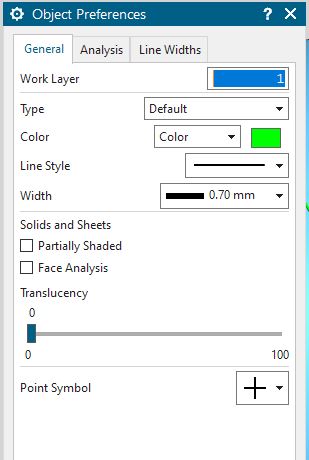
Go to File -> Preferences -> Object

and you will be able to change line width setting for the
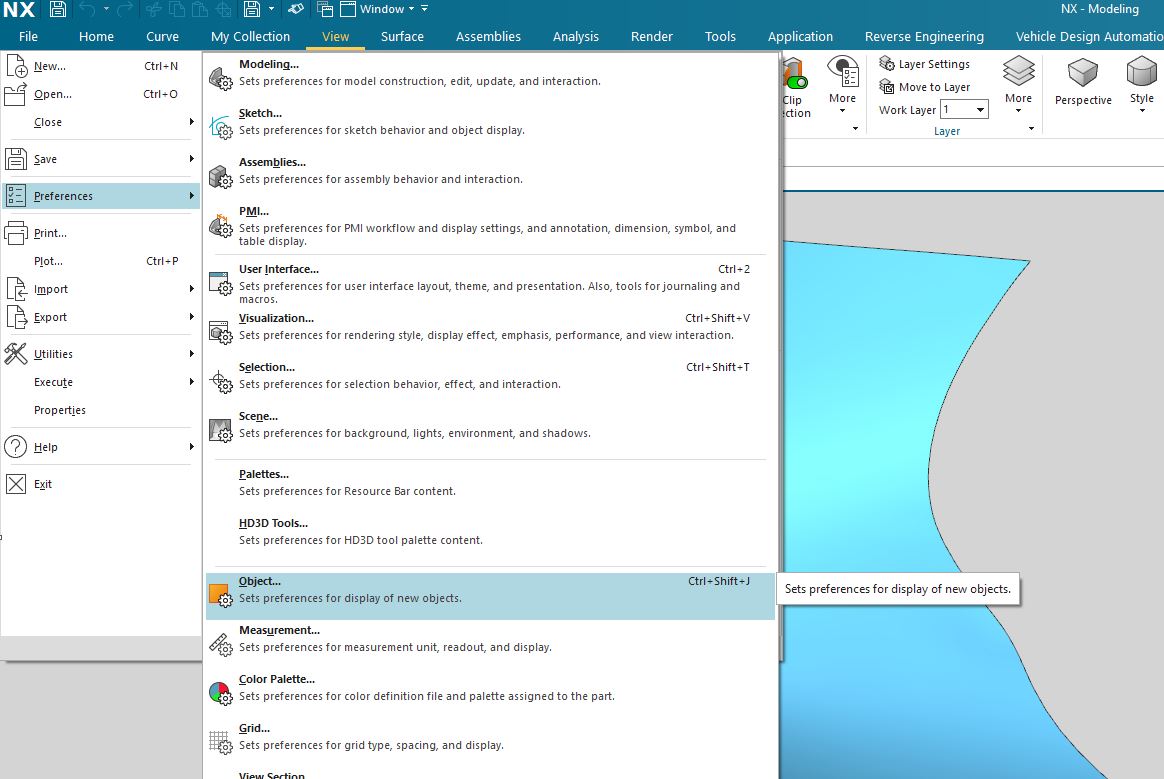
NX Object Display

Object Preferences


Hope this will resolve your issue


ReplyQuote
 Matt
Eminent Member
Joined: 5 years ago
Posts: 18
Topic starter
Translate
English
Spanish
French
German
Italian
Portuguese
Russian
Chinese
Japanese
Korean
Arabic
Hindi
Dutch
Polish
Turkish
Vietnamese
Thai
Swedish
Danish
Finnish
Norwegian
Czech
Hungarian
Romanian
Greek
Hebrew
Indonesian
Malay
Ukrainian
Bulgarian
Croatian
Slovak
Slovenian
Serbian
Lithuanian
Latvian
Estonian
 

@thelonious


I tried yes with this setting it can change the line width & color only for current NX session. I mean once I close the NX and re start the NX and work with new model file the changes are gone. I did some digging that with NX "Customer Defaults" have option to setup the different line/object types setting. I made those changes however again once I start new session of NX and start new model those changes are not make effect.

What, have I missing? even "Customer Default" settings are not loading 


ReplyQuote
Great Ruler Moderator
Joined: 5 years ago
Posts: 60
Translate
English
Spanish
French
German
Italian
Portuguese
Russian
Chinese
Japanese
Korean
Arabic
Hindi
Dutch
Polish
Turkish
Vietnamese
Thai
Swedish
Danish
Finnish
Norwegian
Czech
Hungarian
Romanian
Greek
Hebrew
Indonesian
Malay
Ukrainian
Bulgarian
Croatian
Slovak
Slovenian
Serbian
Lithuanian
Latvian
Estonian
 
Posted by: @matt

@thelonious


I tried yes with this setting it can change the line width & color only for current NX session. I mean once I close the NX and re start the NX and work with new model file the changes are gone. I did some digging that with NX "Customer Defaults" have option to setup the different line/object types setting. I made those changes however again once I start new session of NX and start new model those changes are not make effect.

What, have I missing? even "Customer Default" settings are not loading 

Once you change the "Customer Defaults", use the "Blank" templates for new model file in every NX session. By default NX selecting "Model" as templates for new model file. In Blank templates load what's set on Customer Defaults.
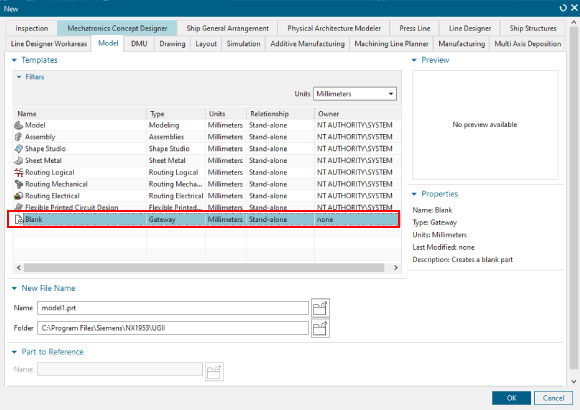
Blank Template for Customer Default


ReplyQuote

Welcome to WiYa3D...!

Login to your account below

Create New Account!

Fill the forms bellow to register

*By registering into our website, you agree to the Terms & Conditions and Privacy Policy.

Retrieve your password

Please enter your username or email address to reset your password.