

ADVERTISEMENT

AI Assistant
STL file Import Iss...
 
Notifications
Clear all

STL file Import Issue "Failed to import the selected file"

6 Posts
3 Users
2 Reactions
5,074 Views
Active Member
Joined: 4 years ago
Posts: 4
Topic starter
Translate
English
Spanish
French
German
Italian
Portuguese
Russian
Chinese
Japanese
Korean
Arabic
Hindi
Dutch
Polish
Turkish
Vietnamese
Thai
Swedish
Danish
Finnish
Norwegian
Czech
Hungarian
Romanian
Greek
Hebrew
Indonesian
Malay
Ukrainian
Bulgarian
Croatian
Slovak
Slovenian
Serbian
Lithuanian
Latvian
Estonian
  [#288]

Hi 

I'm having issue in importing stl files to the Geomagic Design X. When I try to import stl file the following massage appear

"Failed to import the selected file. File may be corrupted or an invalid format"

I tested with few stl files, that load with other CAD software. Now I'm sure some issue in importing STL files to Design X. What's the issue here any help?


ReplyQuote
Great Ruler Moderator
Joined: 5 years ago
Posts: 60
Translate
English
Spanish
French
German
Italian
Portuguese
Russian
Chinese
Japanese
Korean
Arabic
Hindi
Dutch
Polish
Turkish
Vietnamese
Thai
Swedish
Danish
Finnish
Norwegian
Czech
Hungarian
Romanian
Greek
Hebrew
Indonesian
Malay
Ukrainian
Bulgarian
Croatian
Slovak
Slovenian
Serbian
Lithuanian
Latvian
Estonian
 

It's bit strange, even STL file format invented by 3D System, which developed Geomagic Design X.

Does "STL Files" listed on importing file types drop down menu?


Murphy reacted
ReplyQuote
Active Member
Joined: 4 years ago
Posts: 4
Topic starter
Translate
English
Spanish
French
German
Italian
Portuguese
Russian
Chinese
Japanese
Korean
Arabic
Hindi
Dutch
Polish
Turkish
Vietnamese
Thai
Swedish
Danish
Finnish
Norwegian
Czech
Hungarian
Romanian
Greek
Hebrew
Indonesian
Malay
Ukrainian
Bulgarian
Croatian
Slovak
Slovenian
Serbian
Lithuanian
Latvian
Estonian
 
Posted by: @thelonious

It's bit strange, even STL file format invented by 3D System, which developed Geomagic Design X.

Does "STL Files" listed on importing file types drop down menu?

I checked, there is no STL file type listed
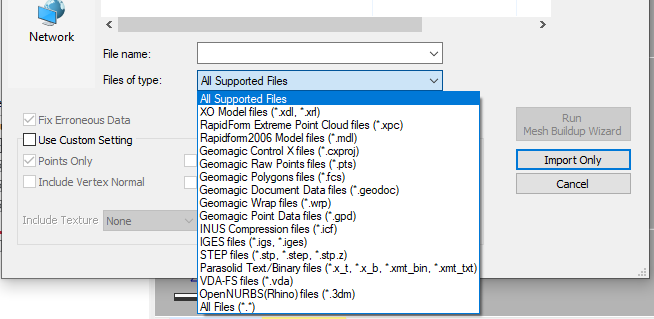
Geomagic Design X Import File Types

Does my software has installed with limited features? you state that STL invented by 3D System, then how stl file types not listed first place?


ReplyQuote
Great Ruler Moderator
Joined: 5 years ago
Posts: 60
Translate
English
Spanish
French
German
Italian
Portuguese
Russian
Chinese
Japanese
Korean
Arabic
Hindi
Dutch
Polish
Turkish
Vietnamese
Thai
Swedish
Danish
Finnish
Norwegian
Czech
Hungarian
Romanian
Greek
Hebrew
Indonesian
Malay
Ukrainian
Bulgarian
Croatian
Slovak
Slovenian
Serbian
Lithuanian
Latvian
Estonian
 

yes, It's seems, the software package you have installed has limited features, some reason. In original Geomagic Design X support over 60 file format types to import. Try to re-install the software with complete package first.


Murphy reacted
ReplyQuote
Active Member
Joined: 4 years ago
Posts: 4
Topic starter
Translate
English
Spanish
French
German
Italian
Portuguese
Russian
Chinese
Japanese
Korean
Arabic
Hindi
Dutch
Polish
Turkish
Vietnamese
Thai
Swedish
Danish
Finnish
Norwegian
Czech
Hungarian
Romanian
Greek
Hebrew
Indonesian
Malay
Ukrainian
Bulgarian
Croatian
Slovak
Slovenian
Serbian
Lithuanian
Latvian
Estonian
 
Posted by: @thelonious

yes, It's seems, the software package you have installed has limited features, some reason. In original Geomagic Design X support over 60 file format types to import. Try to re-install the software with complete package first.

I contact the agent and re-install the software completely. And you are correct there was something wrong with my initial installation. Now STL files import without any issue.


ReplyQuote
New Member
Joined: 2 years ago
Posts: 1
Translate
English
Spanish
French
German
Italian
Portuguese
Russian
Chinese
Japanese
Korean
Arabic
Hindi
Dutch
Polish
Turkish
Vietnamese
Thai
Swedish
Danish
Finnish
Norwegian
Czech
Hungarian
Romanian
Greek
Hebrew
Indonesian
Malay
Ukrainian
Bulgarian
Croatian
Slovak
Slovenian
Serbian
Lithuanian
Latvian
Estonian
 

This happens me due to improper licensing. To activate all features, license need to be properly configured.


ReplyQuote

Welcome to WiYa3D...!

Login to your account below

Create New Account!

Fill the forms bellow to register

*By registering into our website, you agree to the Terms & Conditions and Privacy Policy.

Retrieve your password

Please enter your username or email address to reset your password.