
ADVERTISEMENT

AI Assistant
Issue with Extrusio...
 
Notifications
Clear all

Issue with Extrusion of a circle in a 2D sketch

6 Posts
2 Users
0 Reactions
4,299 Views
Active Member
Joined: 4 years ago
Posts: 4
Topic starter
Translate
English
Spanish
French
German
Italian
Portuguese
Russian
Chinese
Japanese
Korean
Arabic
Hindi
Dutch
Polish
Turkish
Vietnamese
Thai
Swedish
Danish
Finnish
Norwegian
Czech
Hungarian
Romanian
Greek
Hebrew
Indonesian
Malay
Ukrainian
Bulgarian
Croatian
Slovak
Slovenian
Serbian
Lithuanian
Latvian
Estonian
  [#319]

Hi there,

I tried to reverse engineer a plate with several round holes in Geomagic Design X. Therefore I did a 2D-Sketch creating the needed holes with the circle function. The problem is that the extruded hole have many edges instead of one round edge.(See the picture) Is there any setting that can cause this unprecise extrusion?  Or is it just a display resolution problem? The display setting is set to 5 (medium). My PC struggles at higher resolutions 🙁

Any suggestions are welcomed.


ReplyQuote
Great Ruler Moderator
Joined: 5 years ago
Posts: 60
Translate
English
Spanish
French
German
Italian
Portuguese
Russian
Chinese
Japanese
Korean
Arabic
Hindi
Dutch
Polish
Turkish
Vietnamese
Thai
Swedish
Danish
Finnish
Norwegian
Czech
Hungarian
Romanian
Greek
Hebrew
Indonesian
Malay
Ukrainian
Bulgarian
Croatian
Slovak
Slovenian
Serbian
Lithuanian
Latvian
Estonian
 

At glance look, it's looks like having Graphics/Display issue with your PC. Having not enough Graphics/VGA power & RAM, cause this kind of appearance of edges in any CAD software
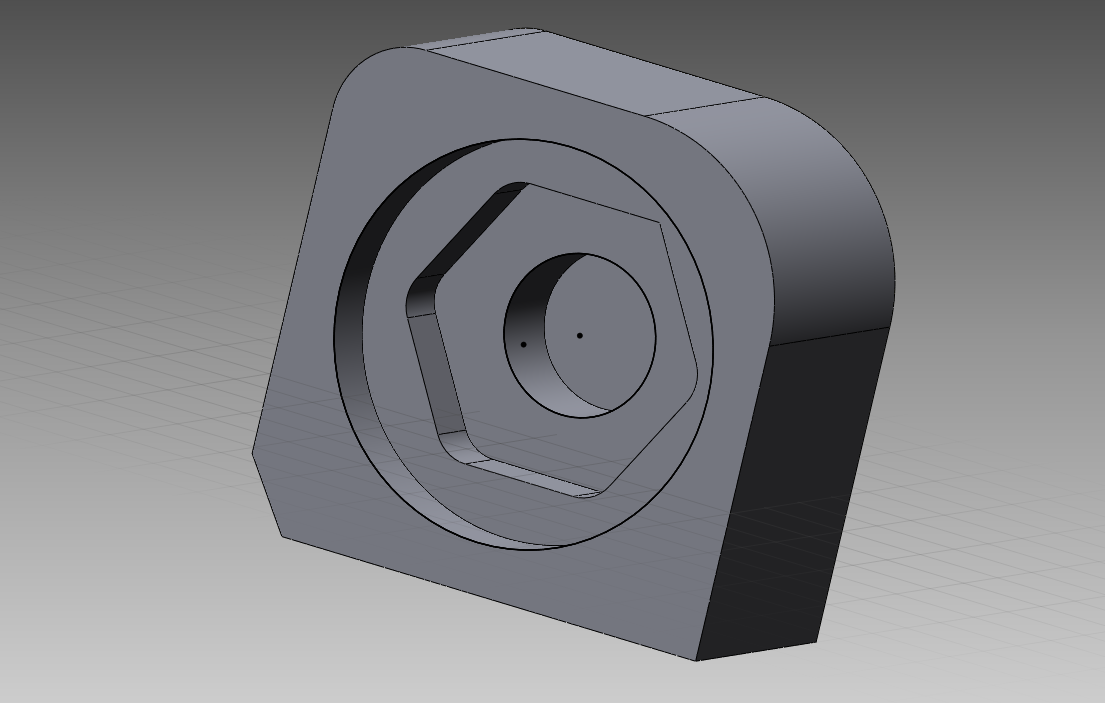
image 2022 06 08 133843636

What's your PC spec / VGA card detail?


ReplyQuote
Active Member
Joined: 4 years ago
Posts: 4
Topic starter
Translate
English
Spanish
French
German
Italian
Portuguese
Russian
Chinese
Japanese
Korean
Arabic
Hindi
Dutch
Polish
Turkish
Vietnamese
Thai
Swedish
Danish
Finnish
Norwegian
Czech
Hungarian
Romanian
Greek
Hebrew
Indonesian
Malay
Ukrainian
Bulgarian
Croatian
Slovak
Slovenian
Serbian
Lithuanian
Latvian
Estonian
 

Ok thats what I thought as well. It's an workstation from my work with a Intel Xeon W-1270P CPU with 32GB RAM and a Nvidia Quadro P2200 inside. It normally handles CAD-programs quite well, but it might have a problem with this one. Is there a way to check, if the generated CAD-Model really has the unprecise shape within the software?


ReplyQuote
Great Ruler Moderator
Joined: 5 years ago
Posts: 60
Translate
English
Spanish
French
German
Italian
Portuguese
Russian
Chinese
Japanese
Korean
Arabic
Hindi
Dutch
Polish
Turkish
Vietnamese
Thai
Swedish
Danish
Finnish
Norwegian
Czech
Hungarian
Romanian
Greek
Hebrew
Indonesian
Malay
Ukrainian
Bulgarian
Croatian
Slovak
Slovenian
Serbian
Lithuanian
Latvian
Estonian
 
Posted by: @hasano20

Ok thats what I thought as well. It's an workstation from my work with a Intel Xeon W-1270P CPU with 32GB RAM and a Nvidia Quadro P2200 inside. It normally handles CAD-programs quite well, but it might have a problem with this one. Is there a way to check, if the generated CAD-Model really has the unprecise shape within the software?

This is pretty much better configuration for CAD, specially you have any CAD recommended Quadro VGA.

Can you post, what are the setting under 

Preference -> Display -> OpenGL 

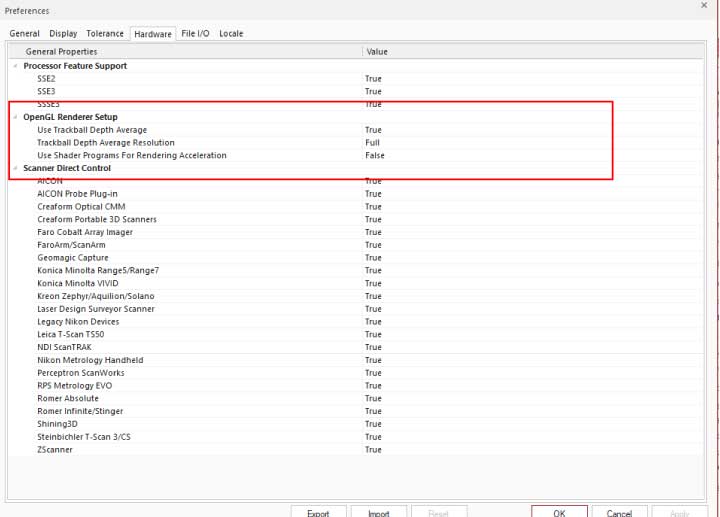
Preference -> Hardware -> OpenGL Render Setup

Open GL Setting

Open GL Render Setting


ReplyQuote
Active Member
Joined: 4 years ago
Posts: 4
Topic starter
Translate
English
Spanish
French
German
Italian
Portuguese
Russian
Chinese
Japanese
Korean
Arabic
Hindi
Dutch
Polish
Turkish
Vietnamese
Thai
Swedish
Danish
Finnish
Norwegian
Czech
Hungarian
Romanian
Greek
Hebrew
Indonesian
Malay
Ukrainian
Bulgarian
Croatian
Slovak
Slovenian
Serbian
Lithuanian
Latvian
Estonian
 

Ok, the settings are mostly the same except in Enabling Animation and Shader Rendering Acceleration. I dont think that these might be the reason for my issue. I will try it out with your settings.


ReplyQuote
Active Member
Joined: 4 years ago
Posts: 4
Topic starter
Translate
English
Spanish
French
German
Italian
Portuguese
Russian
Chinese
Japanese
Korean
Arabic
Hindi
Dutch
Polish
Turkish
Vietnamese
Thai
Swedish
Danish
Finnish
Norwegian
Czech
Hungarian
Romanian
Greek
Hebrew
Indonesian
Malay
Ukrainian
Bulgarian
Croatian
Slovak
Slovenian
Serbian
Lithuanian
Latvian
Estonian
 

I forgot the picture of the hardware setup 🙂


ReplyQuote

Welcome to WiYa3D...!

Login to your account below

Create New Account!

Fill the forms bellow to register

*By registering into our website, you agree to the Terms & Conditions and Privacy Policy.

Retrieve your password

Please enter your username or email address to reset your password.