

ADVERTISEMENT

AI Assistant
Notifications
Clear all

How do I import 3D Scan mesh to assembly in Fusion 360

2 Posts
2 Users
0 Reactions
2,468 Views
New Member
Joined: 4 years ago
Posts: 1
Topic starter
Translate
English
Spanish
French
German
Italian
Portuguese
Russian
Chinese
Japanese
Korean
Arabic
Hindi
Dutch
Polish
Turkish
Vietnamese
Thai
Swedish
Danish
Finnish
Norwegian
Czech
Hungarian
Romanian
Greek
Hebrew
Indonesian
Malay
Ukrainian
Bulgarian
Croatian
Slovak
Slovenian
Serbian
Lithuanian
Latvian
Estonian
  [#303]

I have reverse engineered design automotive part along with  Rapidform XOR3, and I can upload and open the solid model part in Fusion 360. However how do I import the align 3d scan data to the assembly in fusion 360?


ReplyQuote
New Member
Joined: 4 years ago
Posts: 1
Translate
English
Spanish
French
German
Italian
Portuguese
Russian
Chinese
Japanese
Korean
Arabic
Hindi
Dutch
Polish
Turkish
Vietnamese
Thai
Swedish
Danish
Finnish
Norwegian
Czech
Hungarian
Romanian
Greek
Hebrew
Indonesian
Malay
Ukrainian
Bulgarian
Croatian
Slovak
Slovenian
Serbian
Lithuanian
Latvian
Estonian
 

You can import the 3d scanned mesh directly to your Fusion 360 part model.

Just click Insert and there you will find number of file format that support in import to part design.

Insert -> Insert Mesh
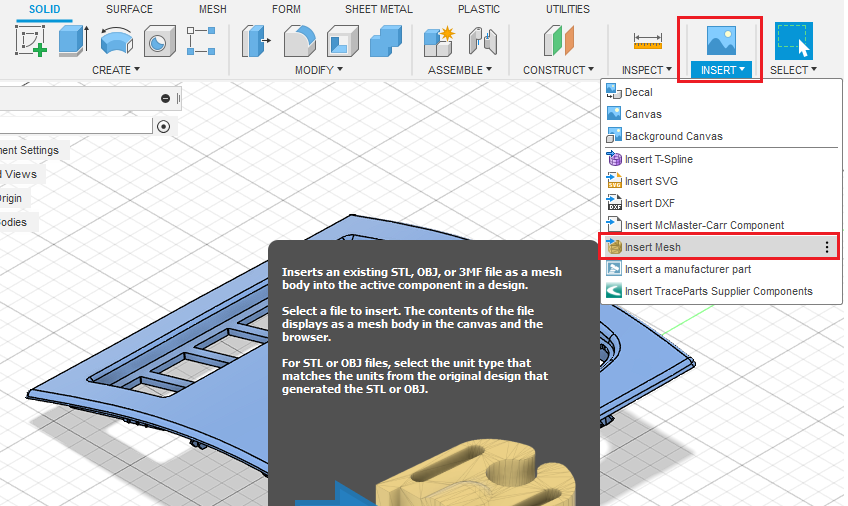
Mesh Insert


ReplyQuote

Welcome to WiYa3D...!

Login to your account below

Create New Account!

Fill the forms bellow to register

*By registering into our website, you agree to the Terms & Conditions and Privacy Policy.

Retrieve your password

Please enter your username or email address to reset your password.