

ADVERTISEMENT

AI Assistant
Notifications
Clear all

Import IGES/DXF line become non- timestamp geometry in Siemens NX

3 Posts
2 Users
2 Reactions
4,265 Views
 Alex
Eminent Member
Joined: 5 years ago
Posts: 16
Topic starter
Translate
English
Spanish
French
German
Italian
Portuguese
Russian
Chinese
Japanese
Korean
Arabic
Hindi
Dutch
Polish
Turkish
Vietnamese
Thai
Swedish
Danish
Finnish
Norwegian
Czech
Hungarian
Romanian
Greek
Hebrew
Indonesian
Malay
Ukrainian
Bulgarian
Croatian
Slovak
Slovenian
Serbian
Lithuanian
Latvian
Estonian
  [#260]

When I import the line/curve set to my model file with IGES/DXF format, it will not shown in the feature tree/history. That it's become non-time stamp geometry. How do I hide/show these line when I needed easily.


Broad reacted
ReplyQuote
Yoda
 Yoda
Jedi Master Moderator Registered
Joined: 5 years ago
Posts: 31
Translate
English
Spanish
French
German
Italian
Portuguese
Russian
Chinese
Japanese
Korean
Arabic
Hindi
Dutch
Polish
Turkish
Vietnamese
Thai
Swedish
Danish
Finnish
Norwegian
Czech
Hungarian
Romanian
Greek
Hebrew
Indonesian
Malay
Ukrainian
Bulgarian
Croatian
Slovak
Slovenian
Serbian
Lithuanian
Latvian
Estonian
 

In Siemens NX unlike other CAD software you can import what ever generic CAD data ( Parasolid, IGES, STEP, DXF,..) to same model file. That individual data type not load/open as  separate file. 

In regarding importing IGES/DXF file are listed in "Non- Timestamp Geometry" in "Part Navigator"
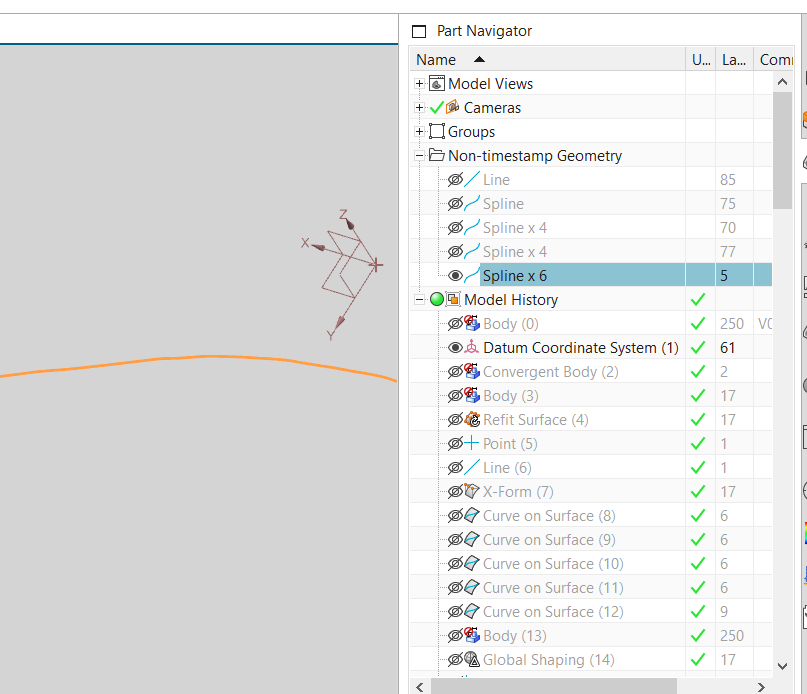
Non Timestamp Geometry

In order to show hide you have two option,

Option 01 - Click show/hide eye mark that related curves from "Non-Timestamp Geometry" listing

Option 02 - Assign the imported curves to Layer, from Layer setting you can show/hide by toggle on/off the particular layer


Grand Master Yoda


Alex reacted
ReplyQuote
 Alex
Eminent Member
Joined: 5 years ago
Posts: 16
Topic starter
Translate
English
Spanish
French
German
Italian
Portuguese
Russian
Chinese
Japanese
Korean
Arabic
Hindi
Dutch
Polish
Turkish
Vietnamese
Thai
Swedish
Danish
Finnish
Norwegian
Czech
Hungarian
Romanian
Greek
Hebrew
Indonesian
Malay
Ukrainian
Bulgarian
Croatian
Slovak
Slovenian
Serbian
Lithuanian
Latvian
Estonian
 
Posted by: @yoda


Option 02 - Assign the imported curves to Layer, from Layer setting you can show/hide by toggle on/off the particular layer

Better option for me is adding to a Layer, which save times for me.

Thank you for your suggestions. 


ReplyQuote

Welcome to WiYa3D...!

Login to your account below

Create New Account!

Fill the forms bellow to register

*By registering into our website, you agree to the Terms & Conditions and Privacy Policy.

Retrieve your password

Please enter your username or email address to reset your password.