

ADVERTISEMENT

AI Assistant
Notifications
Clear all

Where do I find Creo Free Form Surface Modeling Tool?

5 Posts
2 Users
2 Reactions
4,079 Views
Active Member
Joined: 4 years ago
Posts: 3
Topic starter
Translate
English
Spanish
French
German
Italian
Portuguese
Russian
Chinese
Japanese
Korean
Arabic
Hindi
Dutch
Polish
Turkish
Vietnamese
Thai
Swedish
Danish
Finnish
Norwegian
Czech
Hungarian
Romanian
Greek
Hebrew
Indonesian
Malay
Ukrainian
Bulgarian
Croatian
Slovak
Slovenian
Serbian
Lithuanian
Latvian
Estonian
  [#286]

Hi,

As I remember in old Pro/Engineer, I used to use free form surface modeling tool to pull some surface region to direction. However, I skip using  PTC almost 8 years and recently with my new surface modeling with 3D scan data, I'm really need to pull the surface top region to a direction.
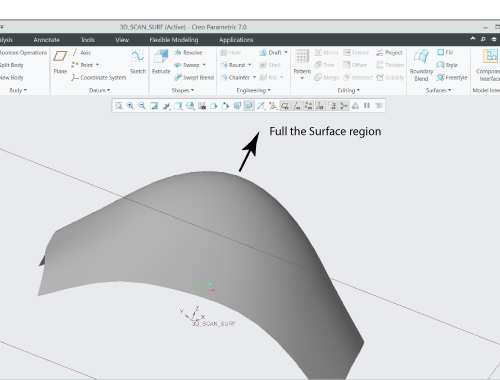
Creo Free Form Surface Modeling

However I cannot find hose Free Form surface tool under surfacing tabs in Creo 7. Where do I find the free form surfacing tool?


ReplyQuote
Yoda
 Yoda
Jedi Master Moderator Registered
Joined: 5 years ago
Posts: 31
Translate
English
Spanish
French
German
Italian
Portuguese
Russian
Chinese
Japanese
Korean
Arabic
Hindi
Dutch
Polish
Turkish
Vietnamese
Thai
Swedish
Danish
Finnish
Norwegian
Czech
Hungarian
Romanian
Greek
Hebrew
Indonesian
Malay
Ukrainian
Bulgarian
Croatian
Slovak
Slovenian
Serbian
Lithuanian
Latvian
Estonian
 

I thinks you are talking about Obsoleted Features, that Creo, not actively shown or use in ribbon bar some reason.

Go to Creo Parametric Options -> Configuration Editor 

and set yes to the enable_obsoleted_features.

Note that require Solid Free Form, Surface Free Form, .. most of the missing features can be find in Command Search.


Grand Master Yoda


Steve reacted
ReplyQuote
Active Member
Joined: 4 years ago
Posts: 3
Topic starter
Translate
English
Spanish
French
German
Italian
Portuguese
Russian
Chinese
Japanese
Korean
Arabic
Hindi
Dutch
Polish
Turkish
Vietnamese
Thai
Swedish
Danish
Finnish
Norwegian
Czech
Hungarian
Romanian
Greek
Hebrew
Indonesian
Malay
Ukrainian
Bulgarian
Croatian
Slovak
Slovenian
Serbian
Lithuanian
Latvian
Estonian
 
Posted by: @yoda

I thinks you are talking about Obsoleted Features, that Creo, not actively shown or use in ribbon bar some reason.

Go to Creo Parametric Options -> Configuration Editor 

and set yes to the enable_obsoleted_features.

Note that require Solid Free Form, Surface Free Form, .. most of the missing features can be find in Command Search.

I try to find enable obsoleted features entry in my Creo parametric option window. There is no such name showing. Does I have miss something installing software?
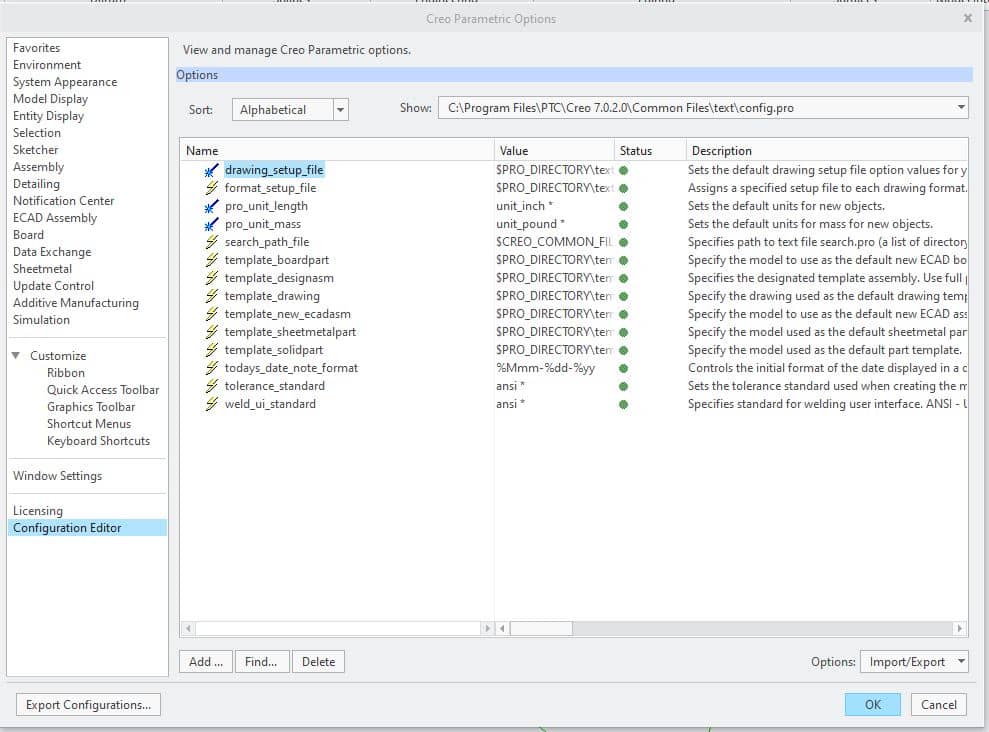
Parametric Option


ReplyQuote
Yoda
 Yoda
Jedi Master Moderator Registered
Joined: 5 years ago
Posts: 31
Translate
English
Spanish
French
German
Italian
Portuguese
Russian
Chinese
Japanese
Korean
Arabic
Hindi
Dutch
Polish
Turkish
Vietnamese
Thai
Swedish
Danish
Finnish
Norwegian
Czech
Hungarian
Romanian
Greek
Hebrew
Indonesian
Malay
Ukrainian
Bulgarian
Croatian
Slovak
Slovenian
Serbian
Lithuanian
Latvian
Estonian
 

In bottom left corner (your image) there is Add button, there you can find the just "obsoleted" and set yes for the enable_obsoleted_features.


Grand Master Yoda


Steve reacted
ReplyQuote
Active Member
Joined: 4 years ago
Posts: 3
Topic starter
Translate
English
Spanish
French
German
Italian
Portuguese
Russian
Chinese
Japanese
Korean
Arabic
Hindi
Dutch
Polish
Turkish
Vietnamese
Thai
Swedish
Danish
Finnish
Norwegian
Czech
Hungarian
Romanian
Greek
Hebrew
Indonesian
Malay
Ukrainian
Bulgarian
Croatian
Slovak
Slovenian
Serbian
Lithuanian
Latvian
Estonian
 

Great.! this is what, I looking for and thank you for guide. Now I can see free form modeling tool
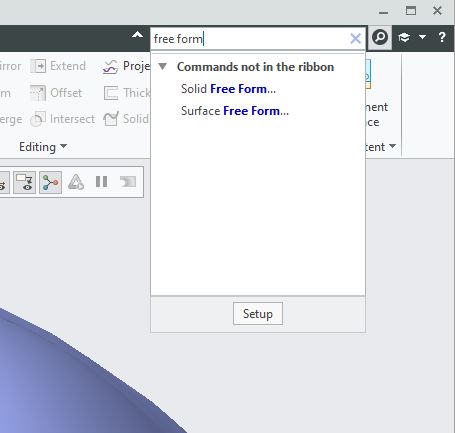
Free Form Surface


ReplyQuote

Welcome to WiYa3D...!

Login to your account below

Create New Account!

Fill the forms bellow to register

*By registering into our website, you agree to the Terms & Conditions and Privacy Policy.

Retrieve your password

Please enter your username or email address to reset your password.