
Short answer: no, AI is not going to replace CAD engineers or drafters in the next few years. It is already replacing a big share of the repetitive tasks inside those jobs. The people most at risk are those whose whole working day is routine drafting: tracing, redrawing, dimensioning standard views and cleaning up imported files. The people who will do well are those who learn to direct AI, check its output, and own the engineering decisions it cannot make.
In 2026 every major CAD vendor shipped AI features that would have sounded like science fiction five years ago. Autodesk Fusion can now write and run its own scripts from a plain-English request. SOLIDWORKS can place drawing views and hole callouts automatically. Startups turn a text prompt into an editable STEP file in seconds. If you earn your living in CAD, it is fair to ask what this means for your job.
This guide goes through it in detail. It covers what AI can really do in CAD today, where it still fails, what is likely to change between now and 2030, and a practical plan to upgrade your skills before the change reaches your desk.
In this article:
- How every earlier CAD revolution changed the job instead of ending it
- What AI can actually do in 3D modeling and CAD in 2026, with real tools
- Where AI still fails at real engineering work
- A realistic 2026–2030 forecast
- Which drafting and CAD tasks are most and least at risk
- A step-by-step skills roadmap for CAD engineers and 2D drafters
CAD has “replaced” drafters before, and the job survived
Fear of losing CAD jobs is not new. Each big jump in design technology wiped out one way of working and created a new one. Knowing that pattern is the best way to read what AI will do.
CAD history timeline · 7 waves, 1950s–2026
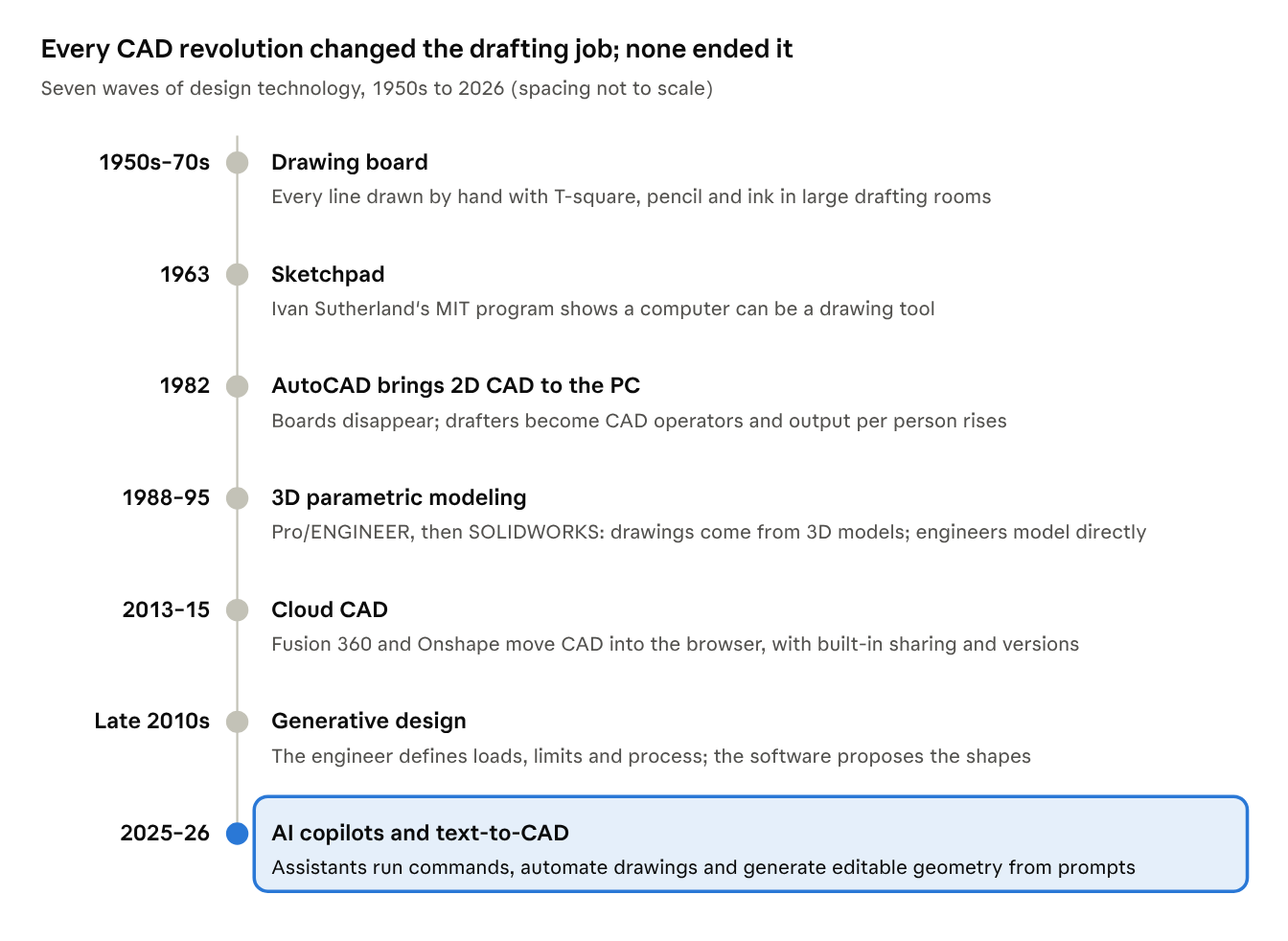
The pattern repeats at every step:
- The routine part of the job shrinks. Tracing, redrawing and lettering went first. Then hand-placed views went, once drawings came straight from 3D models.
- Output per person rises. One CAD operator in the 1990s did the work of several board draftsmen. One engineer with parametric CAD does modeling and detailing that used to need a separate drafting team.
- The job title moves up. Draftsman became CAD operator, then CAD designer, then design engineer. Each step needed more engineering knowledge and less pure drawing skill.
- The people who suffered were the ones who refused to switch tools. Board draftsmen who never learned CAD found their skills in less demand, not because drawings stopped being needed.
AI is the next wave, but it is different in one important way. Earlier tools automated the act of drawing. AI is starting to automate small decisions: where to place a view, which constraint to add, what a first-draft part should look like. That is why this wave feels more threatening, and why the way you prepare matters more this time.
What AI can actually do in CAD today (2026)
At the end of 2026, AI in CAD is real and shipping, but it works as a fast assistant whose output a human still checks. The map below shows where AI features now sit across a normal mechanical design workflow, and how mature each one is.
AI features in major CAD tools, by workflow stage · vendor announcements, Nov 2026
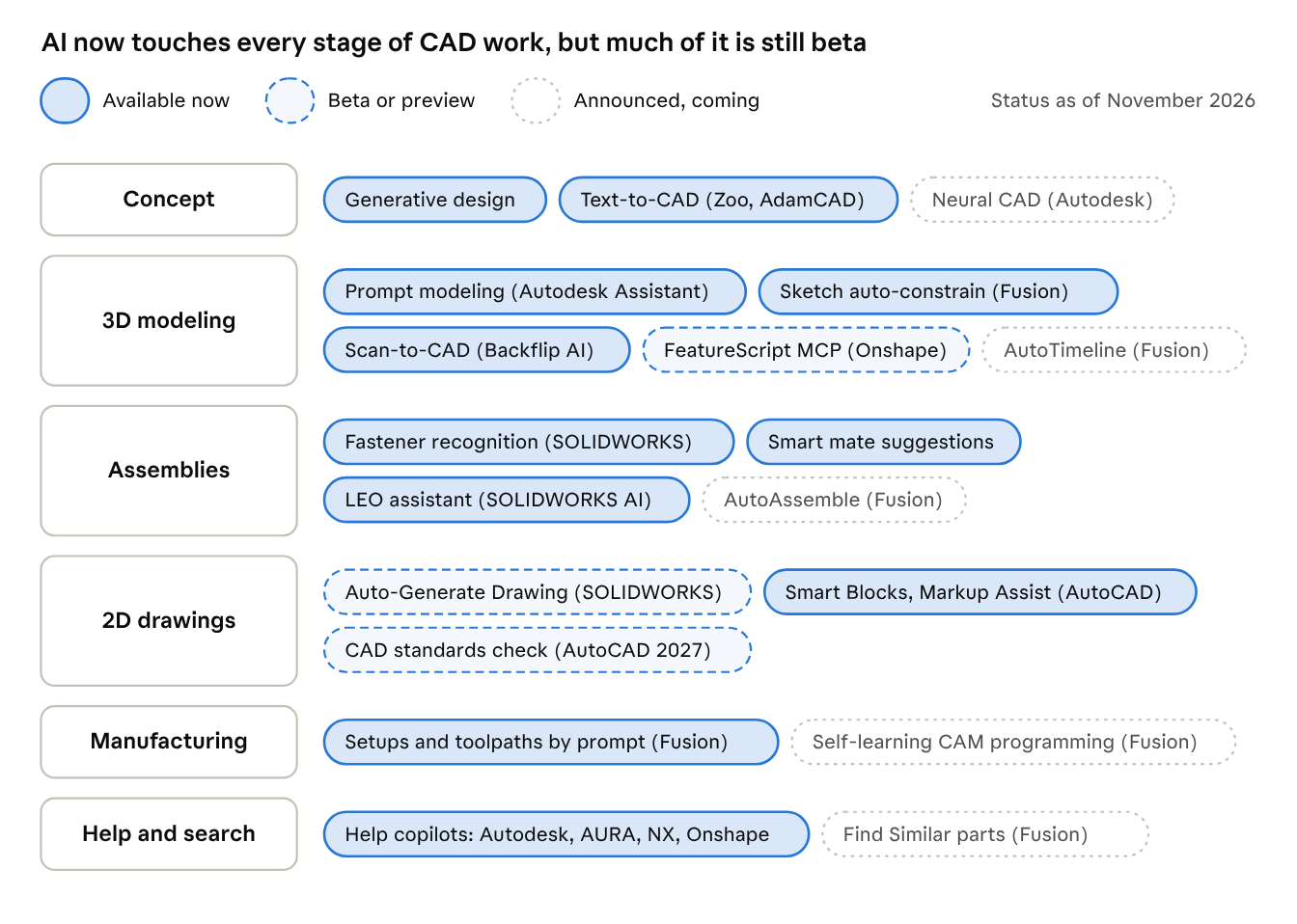
1. CAD copilots that run commands for you
The biggest change this year is that assistants stopped just answering questions and started doing the work. In its April 2026 update, Autodesk Assistant in Fusion gained the ability to write and run scripts against the Fusion API from a plain-language request. You can ask it to extrude, fillet, chamfer, shell or pattern features, change parameters, assign materials, or create CAM setups and toolpaths. Autodesk has since made the Assistant live in Inventor, Moldflow and Vault too.
Other vendors are on the same path:
SOLIDWORKS offers three AI companions: AURA for company knowledge and search, LEO for assembly help, macros written from a description, converting imported STEP files into editable features, and drawings generated from a described intent, and MARIE for materials science.
AutoCAD 2027 adds an Autodesk Assistant tech preview that reads the drawing context through Model Context Protocol (MCP) and can check CAD standards.
Siemens Designcenter (NX and Solid Edge) has a Design Copilot for in-app guidance, and Onshape has AI Advisor.
2. Automatic 2D drawings
This is the feature that hits 2D drafting work most directly. SOLIDWORKS 2026 Auto-Generate Drawing (beta) creates a drawing sheet with views and proposed dimensions in one click. It picks the sheet size, adds section views, and recognizes holes for callouts, even on imported STEP files. For assemblies it inserts the BOM, balloons and revision table automatically. A later update (R2026x FD03) lets you move, align, scale and rotate views by simply typing what you want.
In 2D-only work, AutoCAD’s AI tools now place blocks based on where you placed them before, convert loose geometry into blocks, and read markup notes to carry out MOVE, COPY and DELETE instructions.
3. Text-to-CAD: describe a part, get a model
Startups such as Zoo, AdamCAD and CADScribe turn a text prompt into a STEP or STL file. In a June 2026 test of seven text-to-CAD tools, most handled a simple cylinder but struggled with a gear and a manifold block. The testers’ verdict: useful for simple prototypes and learning, not yet a replacement for professional CAD.
The big vendors are taking a deeper route:
Autodesk neural CAD is a foundation model trained on real CAD data. It is designed to output editable geometry and, for some tasks, the full feature history. It was announced for Fusion and Forma, but Autodesk itself says it cannot yet guarantee perfect precision.
Onshape FeatureScript MCP (Onshape Labs, August 2026) takes a “text → code → CAD” route. Instead of generating one shape, an AI such as Claude or ChatGPT writes, tests and fixes a reusable parametric custom feature from your description.
To show what this looks like in practice, we gave an AI model a plain-English description of a mounting bracket. It wrote the CadQuery (Python) code, and the code produced a real, editable STEP model:

For a simple part like this, the result is usable in minutes. But nothing in the prompt said what the bracket holds, what tolerances the holes need, or how it will be made, so an engineer still has to supply all of that.
4. Scan-to-CAD and reverse engineering
For anyone who converts STL or 3D-scan data into CAD, this is the area to watch most closely. Backflip AI’s second-generation model (August 2026) turns a mesh into a parametric model with a real feature tree of extrudes, revolves and patterns. It then checks its own result and iterates. Backflip says it works best on moderate-complexity 3-axis milled and turned parts, and it now runs as an add-in inside Fusion. Autodesk is also building AutoTimeline, which rebuilds an editable history on “dumb” imported geometry.
Simple prismatic parts will soon take minutes instead of hours. Freeform surfaces, castings, worn or damaged parts, and decisions about which dimensions really matter still need an experienced engineer.
5. Assemblies, generative design and AI CAM
SOLIDWORKS 2026 recognizes and assembles fasteners such as nuts, bolts and washers. Fusion’s announced AutoAssemble predicts where imported components belong and adds the joints itself. Generative design, which proposes shapes from loads and manufacturing limits, has been mature in Fusion for years. Next comes AI-generated CAM programming that learns from how your team edits its toolpaths.
AI CAD tools to know in 2026
These are the AI tools a CAD engineer or drafter is most likely to meet at work or in client requests right now. Status is as of November 2026; features in beta or preview can change before full release.
| Tool | Made by | What the AI does | Status (Nov 2026) |
|---|---|---|---|
| Autodesk Assistant in Fusion | Autodesk | Models features, edits parameters and creates CAM setups and toolpaths by writing Fusion API scripts from plain language | Available |
| Autodesk Assistant in AutoCAD 2027 | Autodesk | In-context help; reads drawing context through MCP and checks CAD standards | Tech preview |
| AutoCAD Smart Blocks and Markup Assist | Autodesk | Places and replaces blocks, converts loose geometry into blocks, applies markup instructions | Available (some parts in preview) |
| Neural CAD for geometry | Autodesk | Foundation model that generates editable CAD geometry, and sometimes its command history, from a prompt | Announced for Fusion and Forma |
| Auto-Generate Drawing | Dassault Systèmes (SOLIDWORKS) | Creates drawing sheets with views, proposed dimensions, section views and hole callouts | Beta |
| AURA, LEO and MARIE | Dassault Systèmes (SOLIDWORKS) | Knowledge search; LEO writes macros, converts STEP files to editable features and generates drawings; materials research | Generally available as SOLIDWORKS AI since July 2026 |
| Onshape AI Advisor | PTC | Answers how-to and best-practice questions inside Onshape | Available |
| Onshape FeatureScript MCP | PTC | Lets Claude, ChatGPT or Gemini write and test reusable parametric custom features | Early access (Onshape Labs) |
| Designcenter Design Copilot | Siemens (NX, Solid Edge) | Natural-language guidance and command help inside the CAD session | Available |
| Zoo Text-to-CAD | Zoo | Text prompt to STEP or STL, built on its own CAD code language (KCL) | Available; best on simple parts |
| AdamCAD | AdamCAD | Parametric and creative modes; outputs STL and OpenSCAD code | Available; best on simple parts |
| Backflip AI | Backflip | Turns 3D scans and STL files into parametric CAD with a feature tree; Fusion add-in and STEP export | Available |
Notice the pattern. The big CAD vendors are adding AI inside the tools engineers already use, while startups attack single jobs such as text-to-CAD and scan-to-CAD. For your career, that means the AI arrives through software updates you would install anyway.
Where AI still falls short in real engineering work
AI can now produce geometry. What it cannot yet produce reliably is engineering: a model whose every dimension, tolerance and relationship is there for a reason, and that a factory can make. Six gaps stand out.
Design intent. A real CAD model encodes which dimensions matter, how features relate, how parts assemble and which process will make them. Fabbaloo’s June 2026 review of text-to-CAD calls missing design intent the most important gap, more than geometry itself. A bracket designed for 3D printing may need a full redesign for injection molding, and AI does not yet make that judgment call.
Precision and valid solids. Even Autodesk says its neural CAD cannot yet guarantee perfect precision. An October 2026 study of a general-purpose AI model’s CAD skills found it useful for first-draft models, but every result still needed checks of geometry, solid validity, assembly relationships and parameter links.
Tolerances and GD&T. Many AI drawing tools can recognize GD&T symbols but struggle with datum strategy, part function and ASME Y14.5 judgment. General chat AI also ignores fit standards such as H7/g6 and can mix up units like psi and MPa, an error of more than 100 times.
Complex parts. In the June 2026 tool test, most text-to-CAD tools failed on a gear and a manifold block, two parts any junior designer can model.
Trust and responsibility. In an IoT Analytics survey of 120 manufacturers (August 2026), only 13% trusted AI for part design or selection decisions, and no more than 3% fully trusted it for any engineering task. Someone has to sign the drawing, and in aerospace or medical work a regulator will ask who approved the design.
Messy real-world context. Clients change their minds, legacy drawings conflict with the physical part, suppliers have limits, and budgets decide the process. Collecting that context and turning it into a correct model is still human work.
| AI is already good at | Humans still own |
|---|---|
| Repetitive modeling commands and parameter changes | Deciding what the part must do and why |
| Placing views, dimensions, balloons and BOMs | Choosing critical dimensions, tolerances and datums |
| Rule-based checks against standards | Judging manufacturability, cost and process |
| First-draft geometry for simple parts | Complex assemblies, freeform shapes, worn or legacy parts |
| Converting scans of prismatic parts to CAD | Taking responsibility and signing off the design |
On the checking side AI is moving fast. In a survey of 250 engineering leaders by design-review vendor CoLab, 74% said AI already beats human checkers at spotting basic design errors, while checks of manufacturability and assembly were expected to take one to two years more. Basic drawing checking is one of the tasks most likely to shrink first.
What CAD will look like in the next few years (2026–2030)
Our forecast: by about 2028, AI in CAD moves from copilot (you ask, it does one step) to agent (you give it a goal, it does many steps and shows you the result). The engineer’s job shifts from operating the software to directing and checking it.
WiYa3D forecast, 2026–2030 · based on Autodesk, Dassault, PTC and Siemens announcements
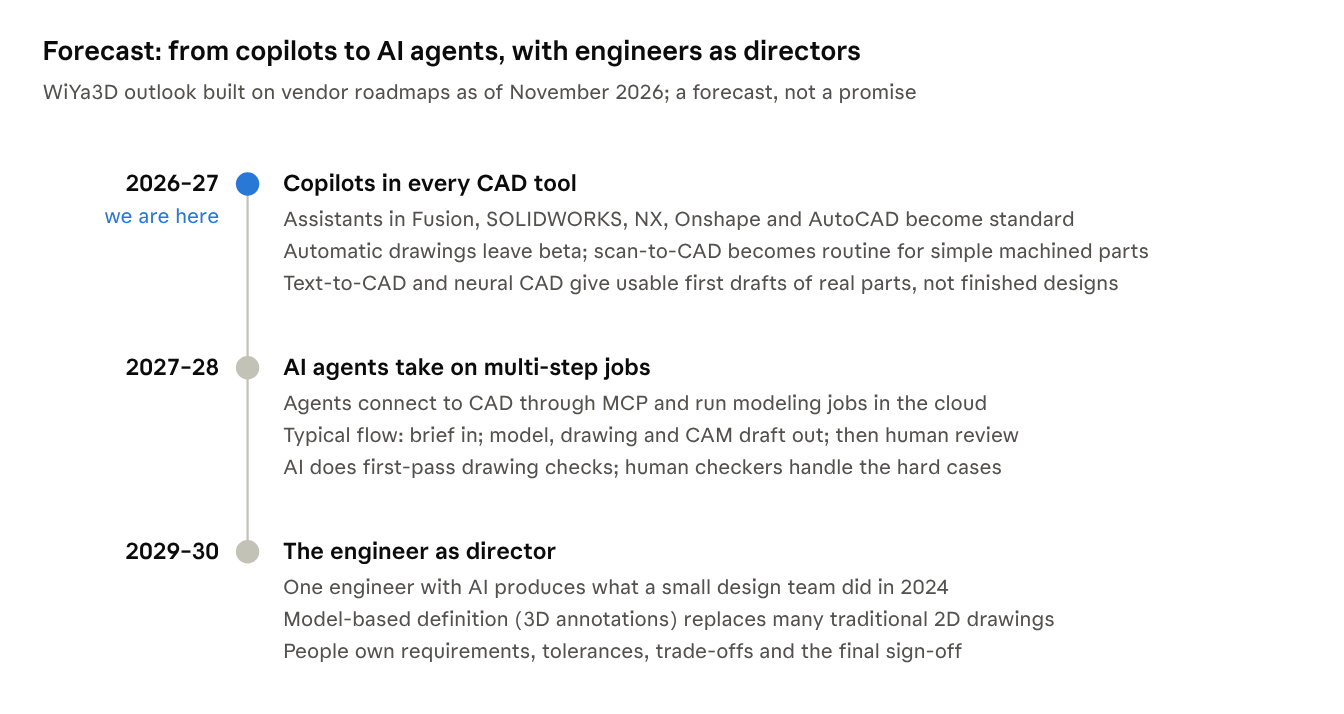
This is not guesswork; the building blocks are already shipping:
AI agents can already drive CAD. By October 2026 Autodesk had released three MCP servers for Fusion. One of them, Fusion Compute MCP, runs Fusion sessions in the cloud so AI agents can carry out design and manufacturing workflows. Autodesk also previewed agentic AI in its PLM system that predicts the impact of changes and coordinates work.
Vendors are training AI on real CAD data. Neural CAD is trained on professional CAD models rather than images, and Autodesk plans to let companies tune it to their own data and processes. An AI that has learned your company’s parts will produce far better first drafts than a general one.
AI writes the automation itself. SOLIDWORKS’ LEO can turn a described task into a working macro and convert imported STEP files into editable features. Onshape’s FeatureScript MCP does the same for custom features. Writing CAD macros used to need a programmer; soon it will need a clear description.
The 2D drawing is under pressure from two sides. AI generates drawings automatically, and model-based definition puts dimensions and tolerances directly on the 3D model. Both reduce the hours spent on classic 2D detailing.
Some things will not change by 2030. Physics, material behavior, manufacturing limits and standards such as ASME Y14.5 and ISO GPS stay the same. Someone still has to take legal and professional responsibility for a design. And speed of adoption depends on trust, which is still low: no more than 3% of manufacturers fully trust AI for any engineering task today. Regulated industries such as aerospace, medical and automotive will move slowest; small shops and freelance work will move fastest.
Will AI replace 2D drafters?
Pure 2D drafting as a stand-alone job will keep shrinking, and AI will speed that up. Drafting as a skill will not disappear; it becomes one part of a broader CAD and engineering role. The official job data already shows the split, even before AI is counted.
BLS Occupational Outlook Handbook, 2025–35 projections (drafters and mechanical engineers pages), visited Nov 2026
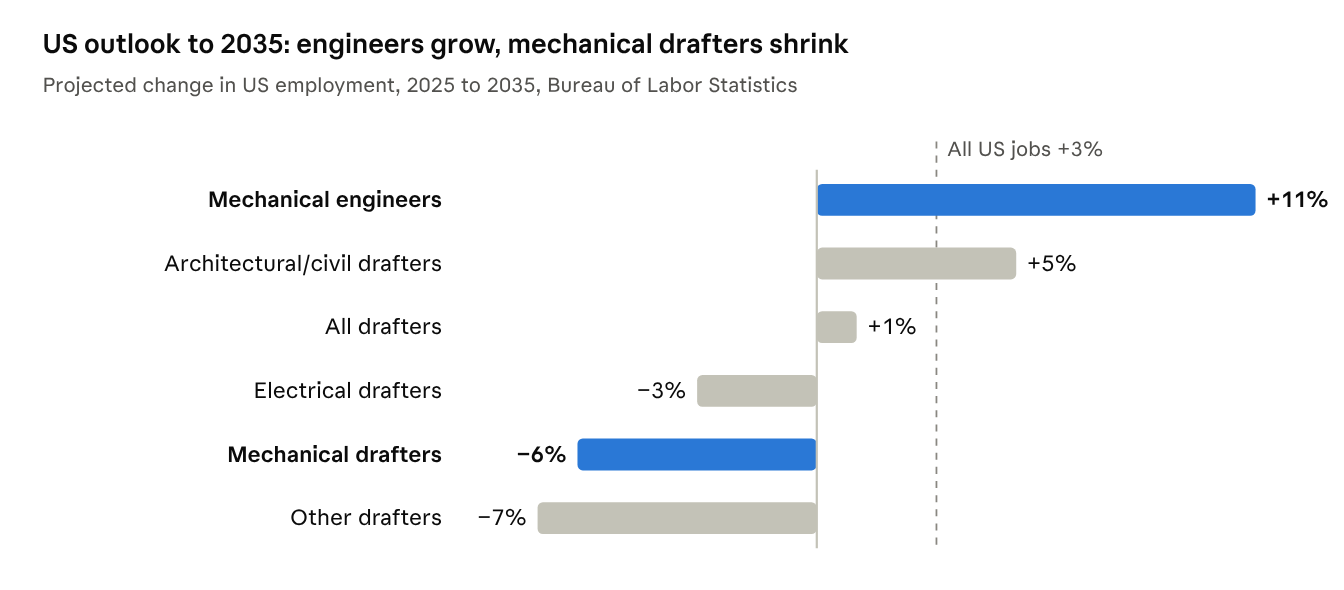
The US Bureau of Labor Statistics projects mechanical drafter jobs to fall 6%, from 42,100 in 2025 to 39,600 in 2035, and electrical drafter jobs to fall 3%. Its explanation is CAD and BIM software that lets engineers do tasks drafters used to do; the outlook does not even name AI yet. Over the same period, mechanical engineer jobs are projected to grow 11%. In plain words: demand is moving away from people who only draw, toward people who design.
There is still work. Drafting overall is projected to have about 14,400 openings a year in the US, mostly to replace people who retire or change careers. Architectural and civil drafting is still growing at 5%.
Which drafting and CAD tasks are most at risk
AI does not replace a job title; it replaces tasks. The more of your day falls in the top rows of this table, the more urgent it is to change what you offer.
| Task | Risk of automation by 2030 | Why |
|---|---|---|
| Standard views, dimensions, BOMs and balloons from a 3D model | High | Already automated in SOLIDWORKS 2026 (beta) |
| Drawing cleanup, layers and block libraries | High | AutoCAD Smart Blocks already detect and convert geometry |
| Basic drawing checks against company standards | High | Rule-based work; AutoCAD 2027 previews standards checking |
| Converting simple machined-part STL or scans to STEP | High | Backflip AI and AutoTimeline target exactly this |
| Redrawing old paper or PDF drawings into CAD | High | Image and markup reading improves every year |
| Modeling standard parts from clear sketches or specs | Medium to high | Prompt modeling and text-to-CAD handle simple parts today |
| Sheet metal, weldments and standard assemblies | Medium | AI helps, but configurations and fit still need checking |
| Complex surfacing, castings and molded parts | Low to medium | Text-to-CAD still fails on complex geometry |
| Reverse engineering worn, damaged or freeform parts | Low | Needs judgment about the original design intent |
| Tolerance stack-ups and GD&T schemes | Low | Needs knowledge of function, datums and process |
| Design for manufacturing, cost and process choices | Low | Depends on suppliers, budgets and real shop limits |
| Client requirements, trade-offs and sign-off | Very low | Someone must be responsible for the design |
If you sell drafting online on Upwork, Fiverr or similar sites, expect prices to fall first for simple 2D drafting, PDF-to-CAD redrawing and simple STL-to-STEP conversion. Clients will try AI first and hire a person when the part is complex, the tolerances matter, or the AI output fails. Position yourself for those jobs, not the easy ones.
Will AI replace CAD engineers and mechanical engineers?
No. For engineers, AI changes the job much more than it removes it. Demand for mechanical engineers is projected to grow 11% in the US by 2035, adding about 33,500 jobs, according to the BLS. The vendors building these tools say the same thing: Dassault Systèmes CEO Pascal Daloz told 3DEXPERIENCE World 2026 that AI is an engine and a companion, not a replacement for engineers.
What changes is where your hours go. The steps that are pure execution move to AI; the steps that need judgment and responsibility stay with you.
How the CAD engineer’s role shifts · WiYa3D illustration

Three trends make this shift likely:
Employers expect to change skills, not just tools. In the IoT Analytics survey, 81% of engineering decision-makers said adopting AI will require changes to engineering skills and team composition.
Skills are changing fast across all jobs. The World Economic Forum’s Future of Jobs Report 2025 expects 39% of workers’ core skills to change by 2030. Its employer survey also found that 77% plan to upskill their staff, while 41% plan to cut staff where AI automates tasks.
Production-heavy creative jobs are the warning sign. The same report put graphic designers among the fastest-declining jobs for the first time, because generative AI now does much of the production work. Drafting is the engineering world’s closest match to that kind of production work.
Who is at risk, and who will do well
Most at risk: the “CAD operator” who models and details other people’s designs without owning decisions, and entry-level roles built on simple, repetitive parts. Fewer junior tasks also means fewer easy ways into the profession, so new graduates need to show more than software skills.
Likely to do well: engineers who combine real domain knowledge (machining, molding, sheet metal, 3D printing, GD&T) with the ability to direct AI tools and check their output fast. When design gets cheaper and faster, companies tend to design more: more variants, more custom products, more iterations. People who can steer that volume will be in demand.
How CAD engineers and drafters can prepare for AI
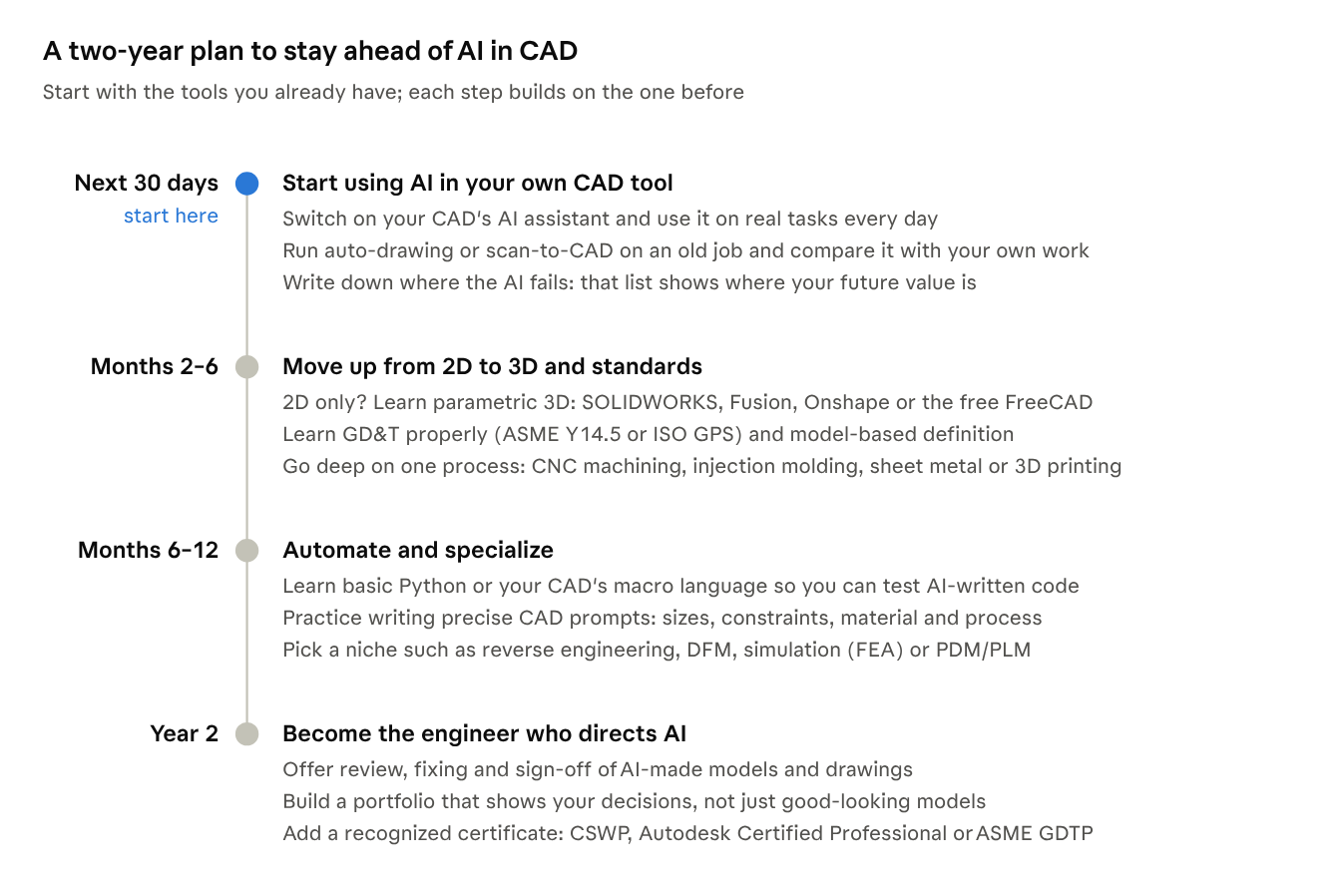
The safest position is not to compete with AI on speed, but to become the person who directs AI and checks its work. That needs three things AI lacks: engineering judgment, knowledge of standards and processes, and responsibility for the result. Here is a practical two-year plan.
Skills roadmap for CAD engineers and drafters · WiYa3D
Upgrade the skills you already have
Most of your current skills are not wasted. They become the base for a more valuable version of the same skill.
| If you are good at… | Upgrade it to… |
|---|---|
| Placing views and dimensions | Choosing critical dimensions, tolerances and datums (GD&T, MBD) |
| Modeling parts from sketches | Defining design intent and quickly checking AI-made models |
| Cleaning up DWG files and blocks | Setting CAD standards and using automation scripts |
| Converting STL or scans to STEP | Reverse engineering complex, worn or freeform parts, plus inspection and measurement |
| Following a drawing checklist | Leading design reviews and design-for-manufacturing decisions |
| Knowing one CAD program well | Knowing a process well (molding, CNC, sheet metal, 3D printing) in any CAD program |
Practical habits that pay off
Treat AI output like a junior colleague’s work. Check every critical dimension, fit and tolerance before it leaves your desk. Your value is the check.
Learn to read code, even if AI writes it. Fusion’s Python API, SOLIDWORKS VBA macros, AutoLISP, Onshape FeatureScript and CadQuery all let AI automate CAD. You need to read and test the code it writes for you.
Keep a library of your own good work. Clean templates, standard parts and well-structured models are what company-tuned AI will learn from. The person who owns that library becomes very hard to replace.
Talk to clients and manufacturers. Gathering requirements and understanding a supplier’s limits are skills AI cannot do for you.
Extra tips for freelance CAD designers
- Rewrite your profile around outcomes and judgment: “manufacturable models with correct tolerances”, not “fast 2D drafting”.
- Add a new service: checking and fixing AI-generated CAD. Many clients will try text-to-CAD or scan-to-CAD first and need a professional when it fails.
- Use AI yourself to deliver faster, then compete on quality and reliability instead of the lowest price.
- Specialize in a niche clients search for, such as reverse engineering for spare parts, 3D printing design, or injection-molded enclosures.
Frequently asked questions
Will AI completely replace CAD drafters?
Not in the next five years. AI is automating routine drafting tasks such as view placement, dimensioning, BOMs and drawing cleanup, so fewer people will do only drafting. Drafters who add 3D modeling, GD&T, standards checking and process knowledge will move into broader CAD designer and design technician roles.
Is CAD still a good career in 2026?
Yes, if you treat CAD as a tool for engineering rather than the whole job. US projections show mechanical engineer jobs growing 11% by 2035 while mechanical drafter jobs fall 6%. The growth is in design, judgment and manufacturing knowledge, not in drawing alone.
Can AI create a 3D CAD model from a text prompt?
Yes, for simple parts. Tools such as Zoo and AdamCAD create STEP or STL files from a description, and Autodesk is building neural CAD for Fusion. In independent tests, these tools still failed on parts like gears and manifold blocks, so the output needs checking and usually rework.
Can AI make 2D engineering drawings automatically?
Yes. SOLIDWORKS 2026 can generate a drawing with views, proposed dimensions, section views, hole callouts and BOMs in one click (beta). The result still needs an engineer to choose critical dimensions, tolerances and notes.
Which CAD software has the best AI features right now?
It depends on your work. Autodesk Fusion’s Assistant can carry out modeling and CAM steps from plain language. SOLIDWORKS leads in automatic drawings and its LEO assistant. Onshape lets external AI tools build custom features through FeatureScript MCP. Use the AI in the software your clients or employer already use.
Will AI replace reverse engineering (STL or scan to CAD)?
For simple machined and turned parts, AI tools like Backflip AI already produce editable feature-based models in minutes. Worn, damaged, cast and freeform parts, and decisions about the original design intent and tolerances, still need an experienced engineer.
What should a CAD engineer learn first to stay relevant?
Start with the AI features inside your own CAD software. Then learn GD&T, one manufacturing process in depth, and enough scripting (Python, VBA or your CAD’s macro language) to check code that AI writes for you.
Should students still study CAD and drafting?
Yes, but combine it with engineering fundamentals: materials, mechanics, tolerances and manufacturing. Employers will hire people who can judge whether an AI-made design will work, and that needs the same fundamentals drafting has always relied on.
Conclusion: AI will not take your CAD job, but it will change it
AI in CAD has moved from demo to daily tool in 2026. It already writes modeling scripts, places drawing views, recognizes holes and fasteners, and turns scans of simple parts into editable models. By around 2028, AI agents will likely handle whole multi-step jobs and hand the result to a person for review.
That makes routine 2D drafting the most exposed part of the profession. It also makes engineering judgment more valuable than ever: knowing what a part must do, which dimensions matter, how it will be made, and taking responsibility for the design. Every earlier CAD revolution rewarded the people who learned the new tool early. This one will too.
Start this month: switch on the AI in the CAD software you already use, test it on a real job, and note where it fails. Those failures show you exactly where your future value lies.
Have you tried AI tools in your CAD work yet? Share what worked and what failed in the WiYa3D forum.