
AI can now turn a photo or a sentence into a 3D sculpture in under a minute. Ask it for an editable part you can open in NX, Creo or SolidWorks, change a hole diameter and send to the machine shop, and the answer is much less impressive. This article explains why, what each kind of AI 3D tool is good for in 2026, and where a CAD engineer is still needed.
The short answer
Most of what many designers assume about AI 3D modeling is still true, with one important update. AI is very good at making meshes: characters, sculptures, figurines and props, ready for Blender and a 3D printer. It is still weak at making editable solid models with a feature tree and exact dimensions. That gap started closing in 2026: a few new tools build editable CAD from a text prompt or a scanned STL, but only for simple, mostly machined parts.
| Common belief | Reality in November 2026 |
|---|---|
| AI can generate a mesh model or sculpture from an image or a description | True. Meshy, Tripo, Rodin, Hunyuan3D and TRELLIS 2 do this in seconds to minutes. |
| The result is used in Blender or a mesh tool, then sliced and 3D printed | Mostly true. Meshes also go to games, AR and the web, but they are not engineering CAD. |
| AI cannot reverse engineer an STL into a solid you can edit in NX, Creo or SolidWorks | Mostly true, changing. New AI tools now rebuild simple machined parts as feature trees; organic and complex parts still need manual work. |
| AI 3D is only for 3D artists | No longer. Text-to-CAD tools now create real solid (B-rep) geometry, and every major CAD vendor has added an AI assistant. |
Mesh vs solid: why the difference matters
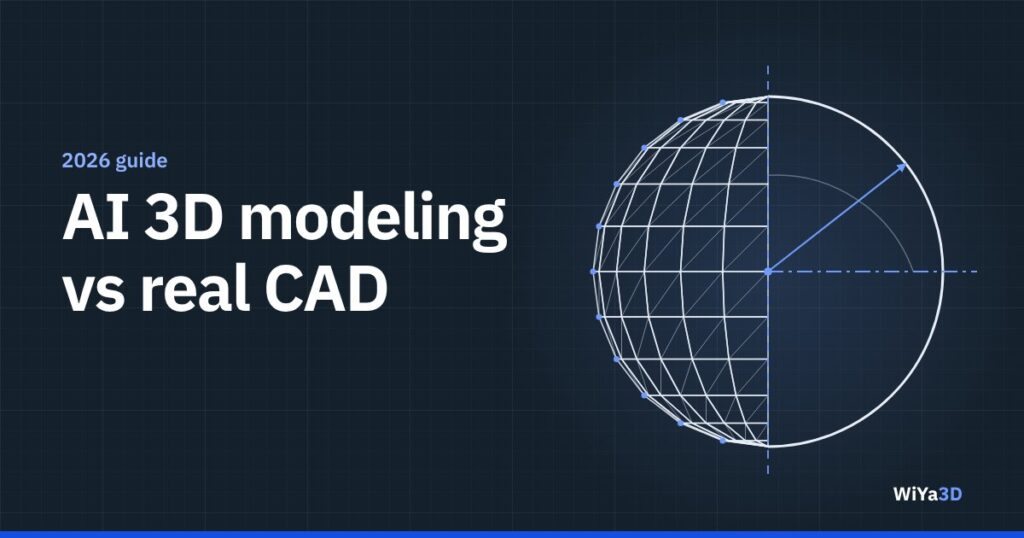
A mesh is a shell of thousands or millions of small triangles. It describes how a shape looks, but it has no idea that a cylinder is a hole or that a flat face is a mounting face. A solid (B-rep) model in NX, Creo or SolidWorks stores true surfaces, edges and features, plus the history of how they were built.
That is why converting one to the other is hard. Going from a solid to a mesh takes one click (Save as STL). Going back means someone, or something, has to recognise every plane, cylinder and fillet and rebuild them as features.
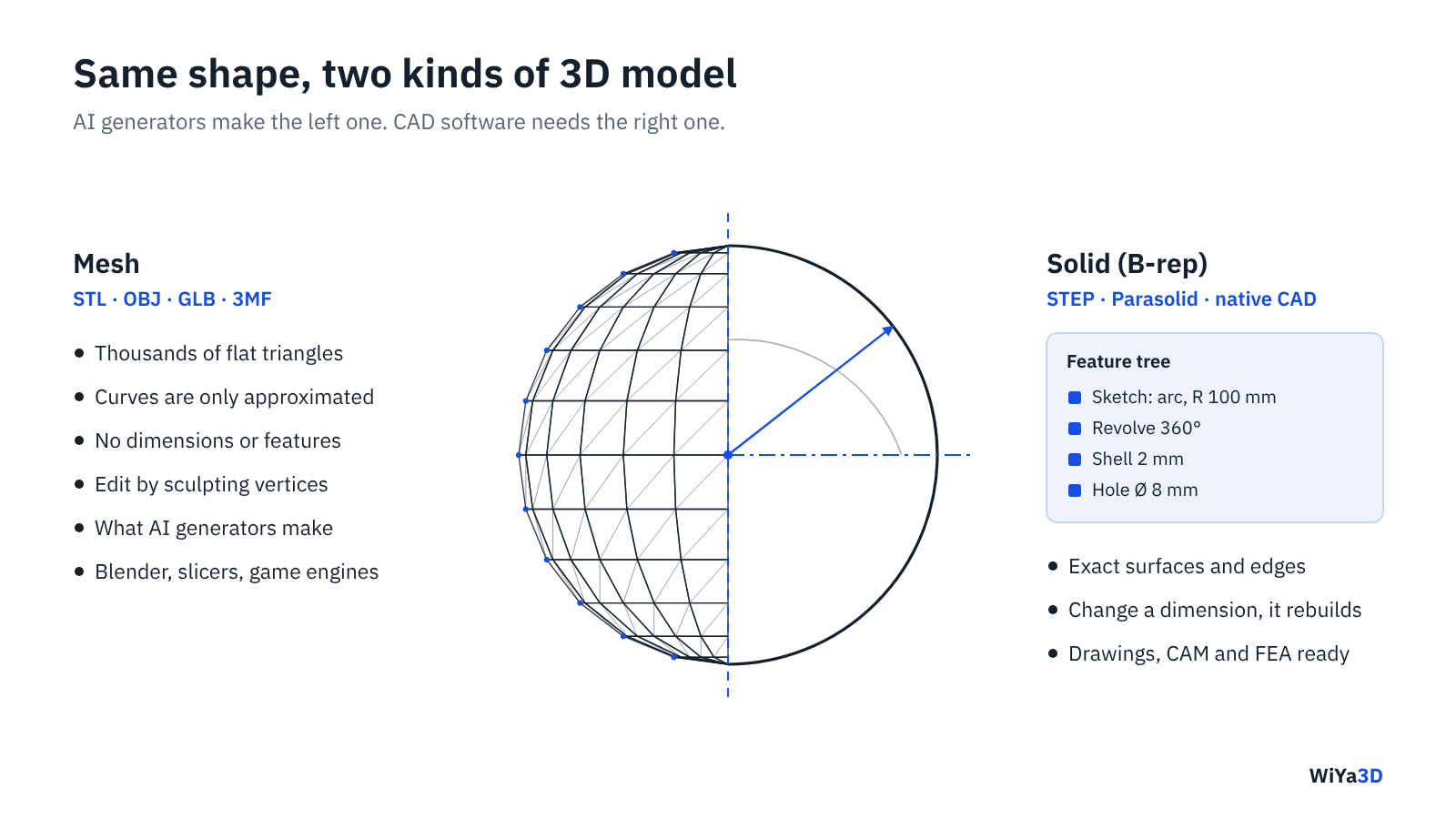
| Mesh (STL, OBJ, GLB, 3MF) | Solid / B-rep (STEP, Parasolid, native CAD) | |
|---|---|---|
| Made of | Triangles (polygons) | Exact surfaces, edges and faces |
| Typical software | Blender, ZBrush, Maya, slicers, game engines | NX, Creo, SolidWorks, CATIA, Fusion, Inventor |
| Curves | Approximated by facets | Mathematically exact |
| Editing | Push and pull vertices, sculpt | Change a dimension, suppress a feature, redo a fillet |
| Dimensions and tolerances | Approximate, no design intent | Exact, driven by parameters |
| Drawings, CAM, FEA | Not directly | Yes |
| Best for | Characters, sculptures, art, visual props, figurines | Machined, moulded and sheet-metal parts, assemblies |
| What AI makes well today | Yes | Early, simple parts only |
What AI can generate today: meshes from text or images
AI 3D generators take either a text prompt or one or more images and return a textured mesh, usually in seconds to a few minutes. Image-to-3D gives far more control than text-to-3D, because the model copies a shape you can see instead of guessing one. Multi-view input (front, side and back of the same object) reduces guessing on the hidden sides.
| Tool | Input | Known for | Print-related features | Price (Nov 2026) |
|---|---|---|---|---|
| Meshy | Text, image, multi-view, sketch | Complete pipeline, textures, rigging | Printability check, auto-repair, auto-split, multi-colour 3MF, send to slicer | Free tier; Pro about US$20/month |
| Tripo | Text, image, 2 to 4 views | Speed (around 10 s), clean topology, auto-rigging | Auto-repair before export; STL and 3MF | Free credits; Pro about US$19.90/month |
| Rodin (Hyper3D) | Text, up to 5 images | Highest geometric and texture detail | Visual first; often needs repair before printing | Credits; Creator about US$30/month |
| Hunyuan3D (Tencent) | Image, text | Clean, smooth meshes; open weights | None built in | Free to self-host; paid API |
| TRELLIS 2 (Microsoft) | Image | Faithful shape from one concept image; open source | None built in | Free on your own GPU |
| Hi3D (formerly Hitem3D) | Image, multi-view | Very high-resolution detail | Splits characters into parts with printable connectors | Free credits; about US$19.90/month |
Prices and plan limits change often, so check each site before you subscribe. All of these export meshes (STL, OBJ, GLB, FBX, and in some cases 3MF), not STEP solids with a feature tree.
Inside Blender itself, add-ons such as Blender MCP connect Blender to an AI assistant, which can then build scenes, set materials and call Rodin or Hunyuan3D to generate a model straight into your file. That speeds up the work, but the result is still a mesh.
How to make an AI character or sculpture you can print
The workflow that works today splits the job: AI makes the shape quickly, and you make it printable. Cleanup time depends on the tool and the detail: Meshy’s guide notes that highly detailed Rodin models often need 20 to 40 minutes of manual repair in Blender.
character and sculpture workflow · 4 steps, 1 check
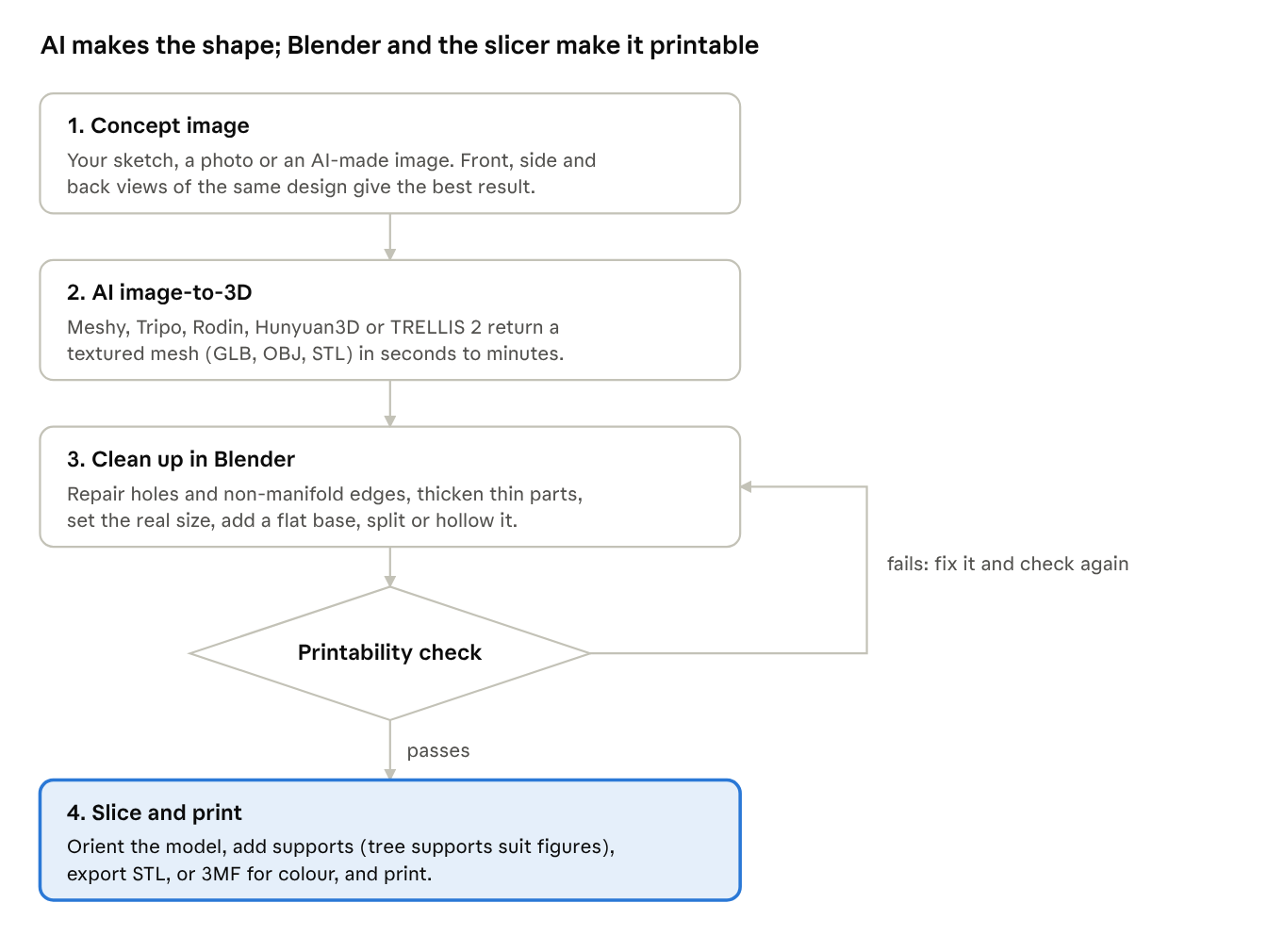
Most failures come from step 3: AI meshes often have holes and paper-thin details, so check the model before every print, not only the first.
Tips for better results
- Start from an image, not just text. Generate or draw a clean concept on a plain background first, then run image-to-3D.
- Use a turnaround sheet (front, side and back views of the same character) so the AI does not invent the back.
- Keep poses compact. Arms close to the body and short hair print far better than outstretched limbs and loose strands.
- Split large figures into head, body and base, with pins or connectors, and print each part in its best orientation.
- For resin, hollow the model and add drain holes; for FDM, keep walls at least 1.2 mm thick.
- For games or animation, retopologise to clean quads, unwrap UVs and rig in Blender, or use Tripo’s or Meshy’s auto-rigging as a start.
AI inside CAD: text-to-CAD and CAD assistants
On the engineering side, AI works in three different ways, and they are easy to confuse. Text-to-CAD tools create a new solid from a description. CAD assistants inside NX, Creo, SolidWorks and Fusion help you work faster but mostly do not design the part for you. Generative design (topology optimisation) grows a shape from loads and constraints, which then needs cleaning up.
| Tool | Where it runs | What it produces | Good for today |
|---|---|---|---|
| Zoo Design Studio with Zookeeper | Own CAD app (Windows, Mac, Linux) | Editable B-rep solids written as KCL code; STEP export | Brackets, plates, enclosures, gears and other simple to medium parts |
| Autodesk neural CAD | Fusion and Forma (rolling out) | Editable CAD geometry from a prompt and constraints | Early concept-to-detail work in Fusion |
| MecAgent | Add-in for SolidWorks | Parts and drawings with native feature trees (vendor claim) | Repetitive parts and drawings in SolidWorks |
| SolidWorks 2026 AURA and LEO | SolidWorks (3DEXPERIENCE) | Answers, guidance, help with assemblies and simulation | Learning commands, troubleshooting |
| Siemens NX and Solid Edge Design Copilot | NX, Solid Edge | Commands in plain language, near-finished drawings, automatic mates | Faster modelling and drawings |
| Creo 13 AI Assistant | Creo | In-tool assistant | Faster modelling in Creo |
| Generative design | Fusion, NX, Creo | Organic, optimised shapes from loads | Lightweight brackets, mostly for 3D printing or casting |
Independent reviews agree on the limits. Text-to-CAD handles simple parts well, but results on complex geometry are unpredictable, and the vendor assistants mostly help you work faster in the tool rather than design the part for you. For a production part with tolerances, design intent and an assembly around it, an engineer still builds the model.
Reverse engineering: STL or scan to editable solid
This is where the common belief needs the biggest update. Until 2025, turning an STL into an editable solid was manual work in reverse-engineering software. In 2026, AI started doing part of that job, but only for certain kinds of parts.
The established route is Geomagic Design X. You segment the mesh into regions, fit planes and cylinders, sketch on mesh sections and rebuild history-based features, with wizards that automate some steps. LiveTransfer then sends the feature history to SolidWorks, NX, Creo and other CAD tools. For organic shapes, its auto-surfacing fits exact surfaces over the mesh, but the result is a patchwork of surfaces with no feature tree to edit.
The new AI route arrived in August 2026, when Backflip AI launched a model that rebuilds STLs and scans as parametric parts with real features (extrude, revolve, pattern). It checks its own result and iterates, in a Fast mode for typical parts and a slower Thinking mode for complex ones. It runs as an Autodesk Fusion add-in and as a web app that exports STEP, which opens in NX, Creo or SolidWorks as an imported solid. Backflip says it works best on moderately complex, 3-axis milled and turned parts, and quotes about US$10 per part against roughly US$1,500 for manual work. There is no independent accuracy data yet.
| Part you start from | Can AI give you an editable solid today? | Best route |
|---|---|---|
| Simple machined part (bracket, flange, housing, shaft) | Yes, increasingly. Feature tree for typical prismatic and turned parts | Backflip, or Design X with its wizards; check every dimension against the drawing or the real part |
| Moulded or cast part with drafts, ribs and blends | Partly. Main features yes, blends and freeform areas need manual work | Design X with manual cleanup, then finish in your CAD |
| Organic sculpture, character or figurine | No. At best a surface patchwork, no useful features | Keep it as a mesh, or auto-surface it only if you must |
| Complex assembly or a part with tolerances that matter | No. AI does not know the design intent or the tolerances | Measure, then model by hand; use the scan only as a reference |
A practical tip for sculptures: you often do not need a solid at all. NX convergent modelling, and mesh tools in other CAD packages, let you combine a mesh with solid features, for example cutting a flat base or adding mounting holes to an AI-generated figure, without converting the whole model.
The limitations to plan for
AI output looks finished on screen long before it is usable. As one maker of AI repair tools put it, visual completeness does not guarantee physical viability.
| Limitation | What happens | What to do |
|---|---|---|
| Broken meshes | Non-manifold edges, holes, flipped normals and internal faces, mostly at fingertips, hair and thin edges; the slicer cannot tell inside from outside | Run a printability check and repair before slicing (Meshy, Tripo, Blender 3D-Print Toolbox) |
| Thin walls and fragile details | Hair strands, swords and fingers print too thin or snap | Thicken in Blender; aim for at least 1.2 mm on FDM and 0.3 mm on resin, as Meshy’s guide suggests |
| No real dimensions | Size and proportions are approximate; holes are not round to a tolerance | Scale in the slicer; never use AI meshes for parts that must fit |
| Guessed hidden sides | The back of a character from a single photo is invented | Use multi-view images or a turnaround sheet |
| Messy topology | Dense triangles, poor for animation or sculpting further | Retopologise (quad remesh) in Blender before rigging |
| Texture seams and baked lighting | Colours look wrong under new lights | Regenerate or repaint the texture; use 3MF for colour prints |
| No design intent | Text-to-CAD and scan-to-CAD do not know which faces mate, or which dimensions are critical | An engineer checks and re-dimensions the model |
| Complex parts | Results on complex geometry are unpredictable; assemblies are beyond today’s tools | Use AI for the first draft, model the rest by hand |
| Licences and IP | Free tiers may be non-commercial, and AI can copy protected characters | Check each tool’s licence before selling prints; create original designs |
Verdict: for art, characters, sculptures and figurines, AI meshes plus Blender plus a slicer is a real, productive workflow today. For engineering parts you will edit in NX, Creo or SolidWorks, AI is a helper for simple parts and first drafts, not a replacement for a CAD engineer.
Which approach for which job
| You want to make | Start with | Finish in | AI’s share of the work |
|---|---|---|---|
| A character, figurine or tabletop miniature | Concept image, then image-to-3D (Meshy, Tripo, Hi3D) | Blender for cleanup and supports, then your slicer | Most of the shape; you fix and prepare it |
| A sculpture, bust or decorative piece | Photo or multi-view images, image-to-3D (Rodin, Hunyuan3D, TRELLIS 2) | Blender or ZBrush for detail, then slicer | Most of the shape |
| A game or animation asset | Text or image-to-3D with rigging (Tripo, Meshy) | Blender: retopology, UVs, rig | Shape and textures |
| A simple bracket, plate or enclosure | Text-to-CAD (Zoo) or a CAD assistant | NX, Creo, SolidWorks or Fusion | A first draft you dimension properly |
| A copy of an existing machined part from a scan or STL | Scan-to-CAD AI (Backflip) or Geomagic Design X | Your CAD, checked against the real part | The feature tree for typical prismatic parts |
| A production part with tolerances, or an assembly | Requirements and drawings | Model by hand in your CAD | Assistants speed up commands and drawings only |
Conclusion
AI has made 3D artists and makers much faster: a character or sculpture that took days to sculpt can now be a printable mesh in an afternoon. For engineers, 2026 is the year the first useful tools arrived, with text-to-CAD for simple parts and scan-to-CAD for typical machined parts. They are worth trying, but every dimension still needs checking, and complex parts, tolerances and assemblies remain human work in NX, Creo and SolidWorks.
FAQ
Can AI make a 3D model from a photo?
Yes. Image-to-3D tools such as Meshy, Tripo, Rodin, Hunyuan3D and TRELLIS 2 turn one or more photos into a textured mesh, usually in under a few minutes.
Can I 3D print an AI-generated model?
Yes, after a printability check and repair. Scale it in the slicer, thicken fragile details and add supports, especially for overhangs above about 45 degrees.
Can AI convert an STL to a STEP file I can edit in SolidWorks, NX or Creo?
For typical machined parts, increasingly yes: Backflip’s scan-to-CAD exports STEP with real features, and Geomagic Design X rebuilds parts with a feature history. For organic models such as characters, no tool gives you a useful feature tree.
Will AI replace CAD engineers?
Not in the near term. Current tools create first drafts and save time on routine steps; design intent, tolerances, manufacturability and assemblies still need an engineer.
Which AI 3D generator is best for 3D printing?
Tools with built-in print preparation, such as Meshy, Tripo and Hi3D, need the least repair work. Rodin gives the most detail but usually needs repair in Blender before printing.