

Notifications
Clear all

Topic starter
17/12/2020 8:00 pm
Can anybody here who can help me to fix geometry ?
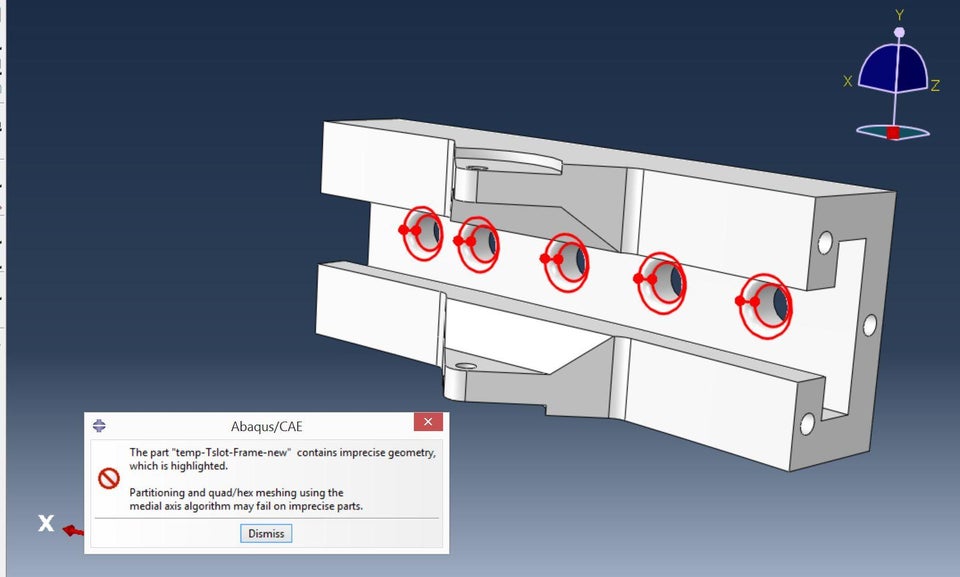
This topic was modified 2 days ago by WiYa3D

17/12/2020 8:04 pm
You should re import the part without chamfer. You can add chamfer in abacus. Or you can also ignore the warning and partition the aprt
17/12/2020 8:06 pm
Don't worry just ignore the warning and see the meshes
Topic starter
17/12/2020 8:06 pm
I can't ignore the warning i am getting it again and. Is there anything i can do ?
17/12/2020 8:08 pm
I can't ignore the warning i am getting it again and. Is there anything i can do ?
Its occur due to the resulting from your import. Try importing it form the STEP files. If you still facing the problem let me know
Topic starter
17/12/2020 8:13 pm
I can't ignore the warning i am getting it again and. Is there anything i can do ?
Its occur due to the resulting from your import. Try importing it form the STEP files. If you still facing the problem let me know
Still getting the same error
17/12/2020 8:14 pm
I can't ignore the warning i am getting it again and. Is there anything i can do ?
Its occur due to the resulting from your import. Try importing it form the STEP files. If you still facing the problem let me know
Still getting the same error
You should redraw it in CAE. that geometry is sufficiently simple. I had bad experience trying to fix these errors